Contents
- Agentic workflows: how coding agents work, and where you can steer them
Agentic workflows: how coding agents work, and where you can steer them
This is the written version of a talk I gave in the AI-assisted coding course in August 2026. It covers the slides of the main talk; the prompt-engineering appendix is left for another post. Course notes live at anoopkcn.github.io/ai-assisted-coding.
You type one sentence. What happens next?
Here is a typical exchange with a coding agent such as Claude Code:
> fix the failing test

• Bash(pytest -x)
  └ FAILED tests/test_auth.py::test_login
    fixture 'client' not found
• Read(tests/conftest.py)
• Edit(tests/conftest.py)  +6 lines
• Bash(pytest -x)
  └ 24 passed in 1.8s

The client fixture was never defined,
so pytest could not inject it. I added
it to tests/conftest.py; all tests pass.
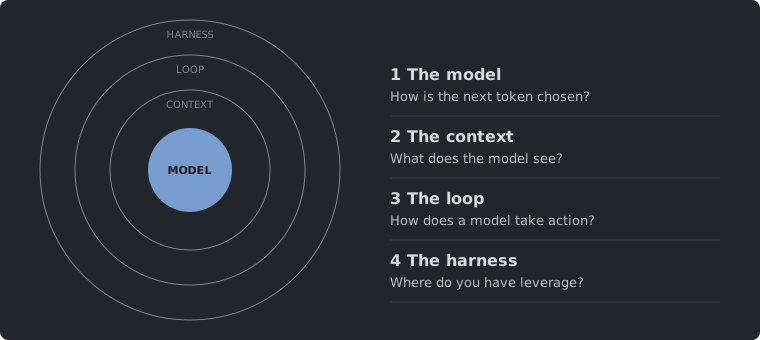
You typed one sentence, and the agent ran the tests twice, read a file, edited it and explained the fix. Four questions hide in that exchange:
- The model. How did it pick each word?
- The context. How did it know your code?
- The loop. How did it run
pytest? - The harness. Who let it edit files?
Each question maps to a layer, and the layers nest. The model sits at the centre. The context is everything the model sees. The loop lets the model act on the world. The harness is the program wrapped around all of it. The rest of this post walks outward from the centre, one layer at a time.
1. The model: how is the next token chosen?
A fast pair programmer with no judgment
Think of the model as a fast, well-read colleague who has never seen your project.
| What it brings | What you bring |
|---|---|
| Broad knowledge of languages and libraries | Direction: what to build and why |
| A first draft in seconds | Judgment: reviewing the changes |
| Patience for boilerplate | The final call on what ships |
Under the hood the model predicts text one token at a time, by probability. It does not “understand” code the way you do.
Tokens: the units a model reads and writes
A token is a chunk of text that the model treats as a single unit. Common words are often one token. Rarer words, identifiers and punctuation get split into several.
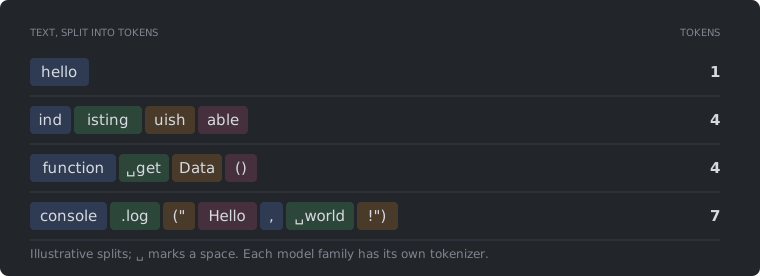
A common rule of thumb is that one token is about four characters of English prose [22]. Two caveats matter for programmers:
- Code costs more tokens per character than prose. Symbols, brackets and camelCase identifiers split into many small pieces.
- Each model family has its own tokenizer, so the same file can have noticeably different counts across models.
Why tokens matter
Tokens are the unit of both cost and capacity.
Cost: you pay per token. Input and output tokens are billed separately, and output tokens cost several times more than input. Pasting a whole file to fix one function wastes input tokens. Asking for a full rewrite where a targeted edit would do wastes output tokens.
Capacity: a fixed budget. The system prompt, tool definitions, messages, files and tool output all share the same context window. The model is also stateless: the whole conversation is re-sent on every request (more on that in section 2). Long sessions fill the window fast.
How the next token is picked
At every step the model assigns a score (a logit) to every token in its vocabulary. The scores are turned into probabilities with a softmax, and one token is sampled from that distribution. The temperature rescales the scores before the softmax:
With you get the model’s own distribution. A lower temperature sharpens it: the top token gets more of the mass. As the top token always wins, which is greedy decoding. A higher temperature flattens the distribution, so less likely tokens get picked more often.
The figure takes the prompt “The animal that barks is the ___” and five candidate tokens. It starts from the probabilities at and applies the formula above to get the other two panels.
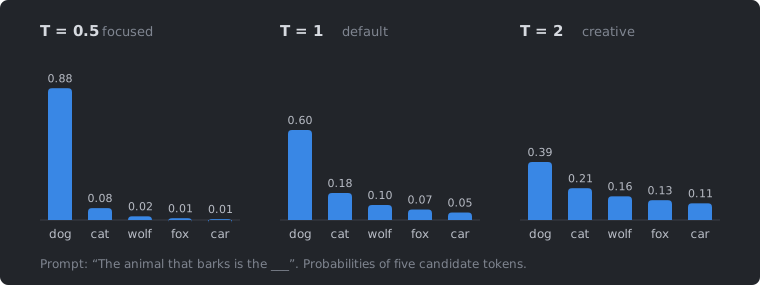
At , dog gets 88% of the mass. At it drops to 39%, and even car gets picked about one time in nine.
Temperature: match it to the task
The right temperature depends on what you want from the model:
| Task | Temperature | Why |
|---|---|---|
| Code generation | 0 | Consistency and correctness |
| Bug fixing | 0 | The most probable fix |
| Code review | 0 – 0.3 | Surface different issues |
| Documentation | 0.3 – 0.5 | Some natural variety |
| Brainstorming | 0.7 – 1.0 | Diverse ideas |
Coding tools such as Claude Code and Cursor set these values for you. You only deal with them when you call the API directly.
Top-p and top-k: drop the tail, then sample
Temperature reshapes the whole distribution. Two other knobs cut off its unlikely tail before sampling:
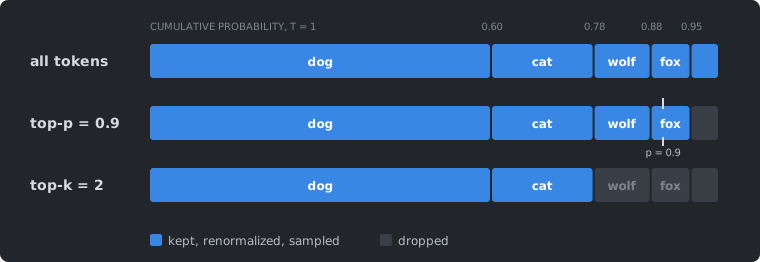
- Top-p (nucleus sampling) [1] keeps the smallest set of tokens whose probabilities add up to at least . Because it works on cumulative probability, it adapts to the shape of the distribution: it keeps few tokens when the model is confident and more when it is unsure.
- Top-k [2] always keeps the most likely tokens, however the probability is spread.
The surviving tokens are renormalized and one is sampled. In the figure below, car is never drawn under either rule.
Model knobs: cheat sheet
| Knob | Default | Notes |
|---|---|---|
temperature | 1.0 | 0 for code. Change this or top_p, not both |
top_p | 1.0 (off) | 0.9 – 0.95 when you want controlled variety |
top_k | off | Rarely exposed by coding tools |
max_tokens | none | Hard cap on the response length |
stop_sequences | none | Strings that end generation early |
A clearer prompt changes the output far more than any of these settings.
Newer reasoning models drop the sampling knobs altogether: Claude Opus 4.7 and later reject them. You set an effort level instead, which controls how much the model thinks before it answers [3].
2. The context: what does the model see?
The context window is working memory
The context window is everything the model can “see” at once: its instructions, the tool definitions and the whole conversation so far. Whatever is left over is free space [4].
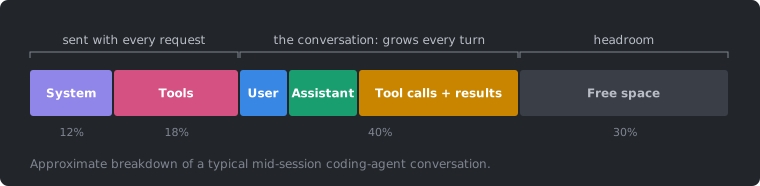
Two parts are sent with every request: the system prompt and the tool definitions. Together they can take close to a third of the window before you type a word. The conversation (your messages, the model’s replies, and above all the tool calls and their results) grows every turn. The remainder is headroom.
The model has no memory between calls
The model keeps nothing between requests. The harness stores the list of messages and re-sends all of it on every request. Each answer is appended and goes out again with the next request.
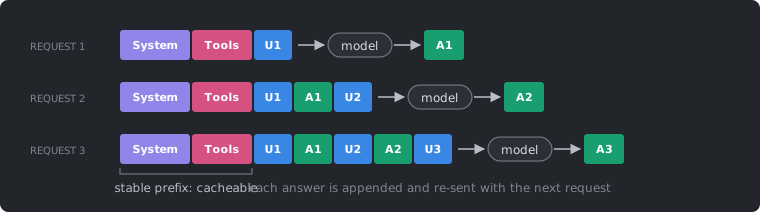
This has three consequences:
Quadratic cost. If every turn re-sends everything before it, the total number of input tokens after turns grows roughly as . Say the prefix is tokens and each turn adds tokens. Then request carries tokens, and after turns you have sent
tokens in total.
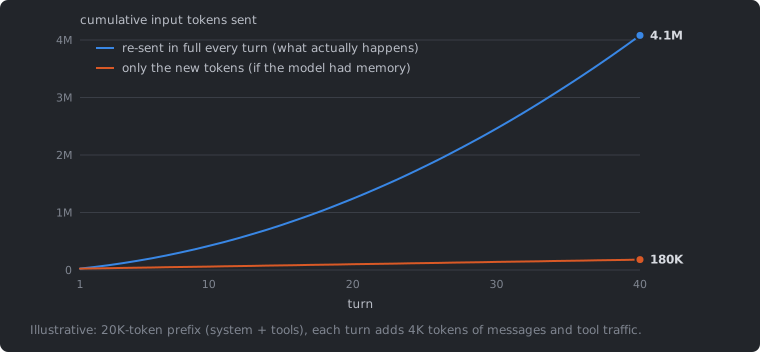
Tool traffic dominates. Tool calls and their results are messages too, and they pile up. A single test run or grep can return thousands of tokens, and those tokens then ride along on every later request.
Keep the prefix stable. Providers cache the unchanged start of a request. With prompt caching, a repeated prefix is billed at a fraction of the normal input price and processed faster [5]. The cache matches byte for byte, so anything that changes the prefix (an edited system prompt, a reordered tool list, a timestamp) invalidates it. Put stable content first and keep it fixed.
Message roles
Every request has two fields that ride along each time, then a list of messages:
| Part | What it holds | Note |
|---|---|---|
| System prompt | Persistent instructions: persona, rules, constraints | A separate field, not a message. Sent first, every time |
| Tool metadata | Name, description and JSON schema of every tool | Sent on every request, whether it is used or not |
| User | Your prompt, and also the results of tool calls | Tool results are observations, not instructions |
| Assistant | The model’s earlier replies: text and tool calls | Re-sent because the model is stateless |
Anatomy of one request
This is what the harness sends to the API [12], slightly trimmed:
{
  "model": "claude-opus-5",
  "system": "You are a coding assistant. Prefer small, tested changes.",
  "tools": [{"name": "read_file",
             "description": "Read a file from the repository.",
             "input_schema": {"type": "object", "required": ["path"],
                              "properties": {"path": {"type": "string"}}}}],
  "messages": [
    {"role": "user", "content": "Why does test_auth fail?"},
    {"role": "assistant", "content": [{"type": "tool_use", "id": "t1",
        "name": "read_file", "input": {"path": "tests/test_auth.py"}}]},
    {"role": "user", "content": [{"type": "tool_result",
        "tool_use_id": "t1", "content": "def test_login(client): ..."}]},
    {"role": "assistant", "content": "The fixture `client` is never..."}
  ]}
Reading it top to bottom: the system prompt, the tool metadata, your prompt, a tool call from the model, the tool result from the harness, and the answer. All of it is re-sent next turn. The tool result arrives as a user message, and the model treats it as something it observed rather than a request from you. That matters when a file or web page contains text that looks like a command.
AGENTS.md: instructions loaded every time
Most harnesses let you keep a project file that is injected into the system prompt on every request. It is the place for what the agent should always know:
# orders-api

## Commands
- Test: uv run pytest -x
- Lint: uv run ruff check --fix

## Conventions
- Python 3.12, type hints everywhere
- Business logic in src/services/
- Never edit files under vendor/
The file name depends on the tool:
| Tool | File |
|---|---|
| Open standard [10] | AGENTS.md |
| Claude Code [11] | CLAUDE.md |
| Cursor | .cursor/rules/*.mdc |
| GitHub Copilot | .github/copilot-instructions.md |
Treat it like any other config:
- Version-control it.
- Keep it short. Every request pays for every line.
- Put the most important rules first.
- Prune stale instructions regularly.
Advertised context is not usable context
Model cards advertise context windows of 128K, 200K or a million tokens. How much of that can a model actually use? The RULER benchmark [6] measures this. It defines a model’s effective length as the longest input at which it still scores above a fixed baseline on retrieval, multi-hop tracing and aggregation tasks. The long-context survey by Liu et al. [7] collects those numbers for a range of models:
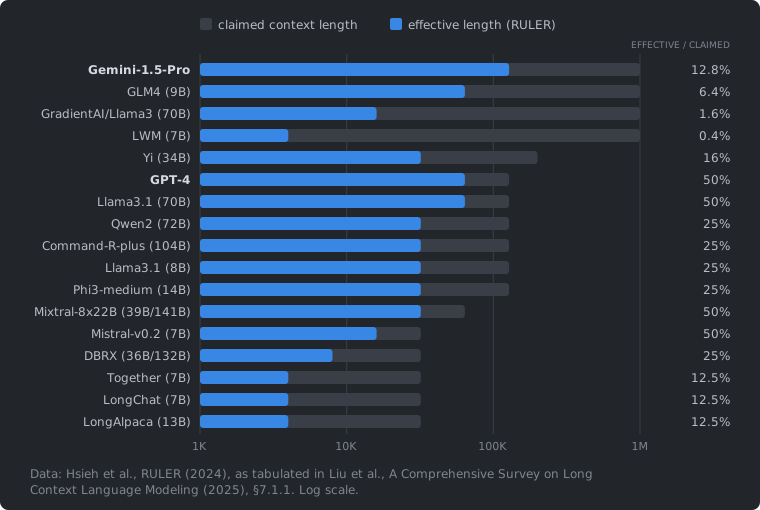
Most models hold up for only 12 – 50% of their advertised length, and some for under 2%. These are 2024 models, and newer ones do better. When you budget a long session, use the effective number.
When the window fills up
Quality drops well before the window is full, in three ways:
- Lost in the middle. Models use information at the start and end of a long context better than information in the middle [8]. As the window fills, details mid-context get overlooked.
- Autocompaction. Near the limit, the harness summarizes older turns. You lose detail, references break, and the agent repeats work it has already done.
- Diluted rules. Conflicting instructions compete, and key requirements fade.

Compaction: summarize, then drop
Near the limit the harness swaps older turns for a summary. The system prompt, tool definitions and the most recent turns stay as they are.
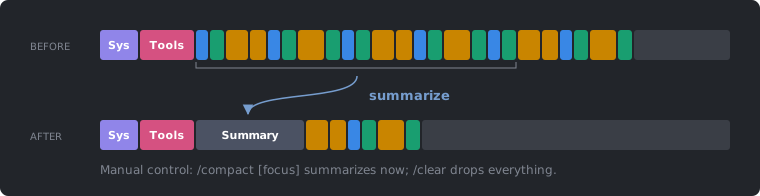
What survives and what is lost:
| Survives | Lost |
|---|---|
| Facts the summary mentions | Exact output, error messages, line numbers |
| The most recent turns | Earlier reasoning and rejected options |
| Anything on disk | Constraints you stated only once |
The last row of the right column is the dangerous one. If a constraint matters, write it into AGENTS.md or a file on disk, or restate it after compaction.
Cheaper levers than compaction
Compaction is the last resort. There are cheaper ways to keep the window small [9]:
- Truncate output. The harness caps long tool results. You can do it too:
tail,grep,--quiet. - Clear old results. Keep the tool call but drop its bulky result once it has been used.
- Delegate. Run noisy work in a subagent; only its conclusion comes back (see section 4).
- Persist to files. Plans and notes on disk survive compaction.
- Load fewer tools. Every tool definition is sent every turn. Remove MCP servers you do not use.
- Start fresh. The only lossless option: you choose what carries over.
Context hygiene
| Do | Don’t |
|---|---|
/clear between tasks | Paste whole files or logs |
| Point at files instead of pasting them | Drift across unrelated tasks in one session |
Keep AGENTS.md short and ordered | Load MCP servers you won’t use |
| Send noisy work to a subagent | Rely on the model remembering old turns |
| Filter command output | Wait for autocompaction |
| Restate key constraints after compaction |
3. The loop: how does a model take action?
Tools: the model asks, the harness acts
A model can only produce text. It cannot run a test, read a file or edit code. Tools bridge that gap in three steps [12]:
1. Definition (sent with every request). The harness describes each tool: a name, a description and a JSON schema for its input.
{"name": "run_tests",
 "description": "Run the test suite. Call after every code change.",
 "input_schema": {
   "type": "object",
   "properties": {
     "path": {"type": "string"}}}}
2. Call (model to harness). Instead of plain text, the model emits a structured request to use a tool.
{"type": "tool_use",
 "id": "t1",
 "name": "run_tests",
 "input": {"path": "tests/"}}
3. Result (harness to model). The harness runs the tool and sends the output back, tagged with the same id.
{"type": "tool_result",
 "tool_use_id": "t1",
 "content": "3 passed, 1 failed ..."}
The model never runs code. It emits a structured request; the harness runs it and feeds the result back as text. The description is also a prompt: it tells the model when and how to use the tool. “Call after every code change” in the definition above is an instruction, and the model will follow it.
Typical tools in a coding agent: read, edit, write, grep, glob, bash, web fetch and ask user.
The agent loop
Tool use on its own is one step. Put it in a loop and you get an agent [13].
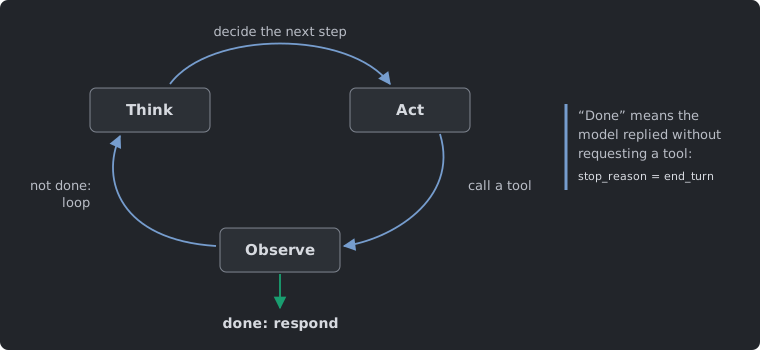
The model thinks about what to do next, acts by calling a tool, and observes the result. If it is not done, it goes round again. That is how it finishes multi-step tasks on its own: search, read, edit, run the tests, and repeat.
How does the loop know when to stop? “Done” means the model replied without requesting a tool. The API signals this with stop_reason = "end_turn" instead of "tool_use".
One turn, step by step
Here is the opening example again, as a sequence of messages between you, the harness, the model and your machine:
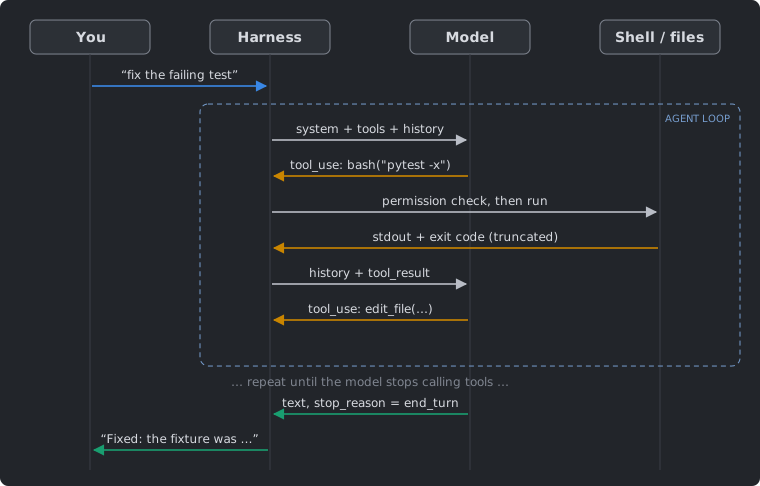
You send one message. The harness sends the system prompt, the tools and the history to the model. The model asks for bash("pytest -x"). The harness checks permissions, runs the command, truncates the output and sends it back. The model asks for an edit, and so on. The loop repeats until the model answers in plain text, and the harness passes that text back to you.
A complete agent in about 20 lines
This is small enough to write out in full. With the Anthropic Python SDK:
import subprocess, anthropic
client = anthropic.Anthropic()
TOOLS = [{"name": "bash", "description": "Run a shell command and return its output.",
          "input_schema": {"type": "object", "required": ["cmd"],
                           "properties": {"cmd": {"type": "string"}}}}]
def run_bash(cmd):                                    # the tool: no checks, no limits
    p = subprocess.run(cmd, shell=True, capture_output=True, text=True)
    return p.stdout + p.stderr
messages = [{"role": "user", "content": input("> ")}]
while True:                                           # the agent loop
    resp = client.messages.create(model="claude-opus-5", max_tokens=16000, tools=TOOLS,
                                  system="You are a coding agent.", messages=messages)
    messages.append({"role": "assistant", "content": resp.content})
    if resp.stop_reason != "tool_use":                # no tool requested: done
        print(next(b.text for b in resp.content if b.type == "text")); break
    results = [{"type": "tool_result", "tool_use_id": b.id, "content": run_bash(b.input["cmd"])}
               for b in resp.content if b.type == "tool_use"]
    messages.append({"role": "user", "content": results})    # results go back as a user turn
Everything from the previous sections is here: the tool definition, the growing messages list that is re-sent every time, the assistant turn with tool calls, the results returned as a user turn, and the stop_reason check that ends the loop.
It works. It will also run rm -rf if the model asks for it, dump a 40 MB log into the context, and hang on npm start, because a dev server never exits.
What a production harness adds
A production harness keeps the same short loop and adds the engineering around it:
| Concern | Naive (above) | Real harness |
|---|---|---|
| Safety | Runs anything, as you | Allow/deny rules, approval prompts, sandbox |
| Output size | Everything into the context | Truncated, paginated, offset/limit parameters |
| Time | Blocks until it finishes | Timeouts, background jobs, cancellation |
| State | A new shell on every call | Persistent working directory and environment |
| Errors | An exception kills the loop | Exit code and stderr returned, flagged is_error |
| Description | One sentence | Hundreds of words: when, how, what to avoid |
| Parallelism | One call at a time | Independent calls run concurrently |
| Cost | Nothing tracked | Token accounting, prompt caching, compaction |
Agent = model + harness
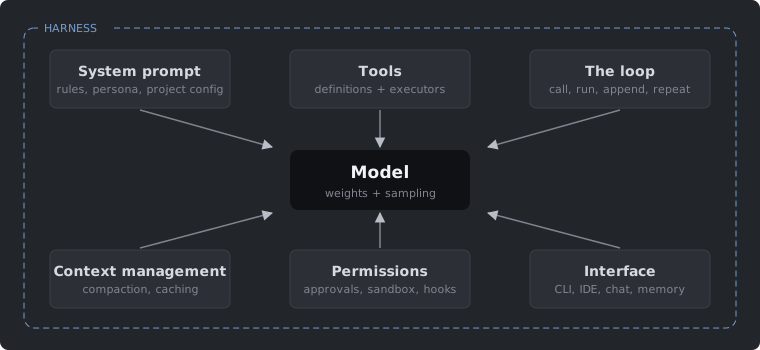
An agent is a model plus a harness. The harness supplies the system prompt (rules, persona, project config), the tools (their definitions and the code that runs them), the loop, context management (compaction, caching), permissions (approvals, sandbox, hooks) and the interface (CLI, IDE, chat, memory). Use the same model with a different harness and you get a different agent. Claude Code, Codex CLI, Cursor and the 20-line script above are all harnesses.
Why the harness matters
- Most of what you experience as “the agent” is harness behaviour: which files it reads first, when it asks permission, how it recovers from a failed test, what it forgets.
- Agent benchmarks score model plus scaffold. Change the scaffold and the score moves. The SWE-agent paper [14] showed this directly: with the same model, a better agent–computer interface (the tools, their output formats and guardrails) solved far more real GitHub issues.
You rarely get to change the model. The harness you change all the time: config files, permissions, hooks, tools, MCP servers, skills, subagents and worktrees.
4. The harness: where do you have leverage?
The tool landscape
| Category | What it is | Examples |
|---|---|---|
| API platforms | You build the harness | Anthropic, OpenAI, Gemini |
| CLI agents | An agent in the terminal | Claude Code, Codex, Gemini CLI |
| IDE extensions | An agent in the editor | Copilot, Cursor, Windsurf |
| Chat assistants | Conversation first | Claude, ChatGPT, Gemini |
Only the first row leaves the harness to you. The other three ship with one.
Six levers you control
- AGENTS.md. What the agent should always know. Loaded on every request (section 2).
- Subagents. Isolate noisy work in a separate context window.
- Worktrees. Isolate files so several sessions can run in parallel.
- Skills. Package a workflow once, and load it only when it is needed.
- MCP. Connect new tools and data sources through one protocol.
- Hooks. Run deterministic checks at fixed points in the loop.
The examples below use Claude Code, but most harnesses have equivalents.
Subagents: a fresh context for noisy work
A subagent is a specialized assistant with its own context window and a restricted tool set [15]. The main agent hands it a task. The subagent does the noisy work (reading dozens of files, running searches) in its own window, and only its conclusion returns to the main conversation.
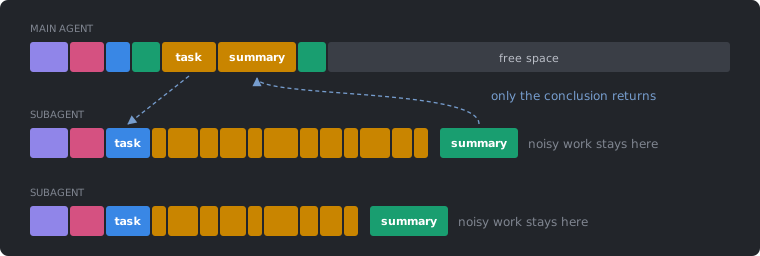
This gives you three things:
- Context isolation. Verbose output stays out of the main conversation.
- Parallelism. Several subagents can run at once.
- Cost control. Simple tasks can go to cheaper, faster models.
Claude Code ships with built-in types. Explore and Plan are read-only; General has full access.
Worktrees: parallel sessions, isolated files
A subagent isolates context; a worktree isolates files. A git worktree is an extra working directory attached to the same repository [16].
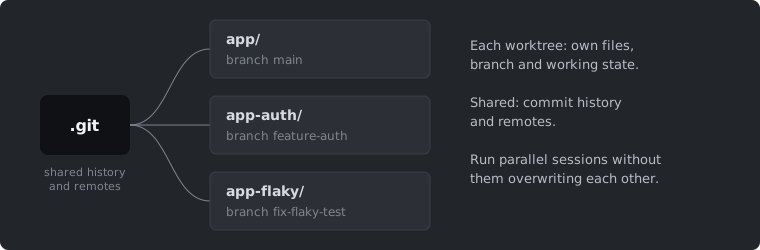
- Each worktree has its own files, branch and working state.
- Commit history and remotes are shared.
- You can run parallel features, experiments or isolated agents without them overwriting each other’s changes.
# plain git
git worktree add ../app-auth -b feature-auth

# Claude Code shortcut
claude --worktree feature-auth
See the Claude Code docs for the full workflow [17].
Skills: reusable workflows, loaded on demand
A skill is a folder with a SKILL.md file: instructions, plus optional scripts and reference files [18].
---
name: explain-code
description: Explains code with diagrams
user-invocable: true
allowed-tools: Read, Grep, Glob
---
When explaining code:
1. Draw a diagram: ASCII art
2. Walk through: step-by-step
3. Highlight a gotcha
Skills are cheap until used. Only the name and description sit in the context. The body is loaded when the skill runs. Compare that with AGENTS.md, which is paid for on every request. You can invoke a skill yourself as a slash command:
/explain-code src/auth/middleware.ts
or let the model pick it based on its description.
MCP: the Model Context Protocol
The Model Context Protocol (MCP) [19] is an open standard for connecting models to tools and data. It is often called “USB for AI”.
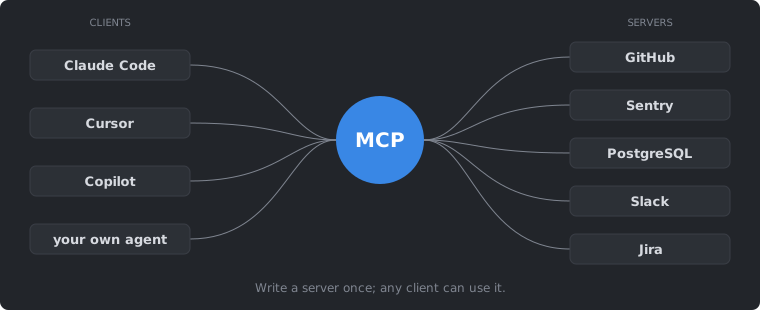
Write a server once and any client can use it. Adding a server to Claude Code is one command [20]:
claude mcp add context7 \
  --transport http --scope user \
  https://mcp.context7.com/mcp
A team can share its setup in a .mcp.json file at the repository root.
The catch: every server adds its tool definitions to every request. Recall the context breakdown from section 2: tools can already be a fifth of the window. Before adding a server, make sure the capability is worth the context it costs.
Hooks: rules that always run
Hooks are shell commands that run at fixed points in the loop [21]. The model can overlook an instruction in AGENTS.md. A hook runs every time its event fires.
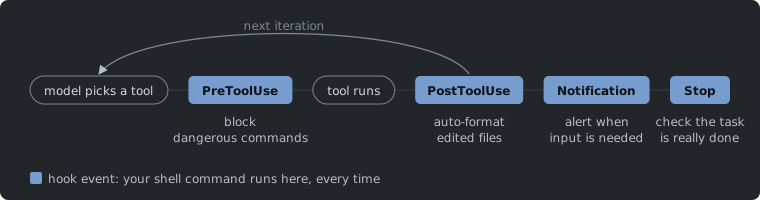
- PreToolUse. Runs before a tool executes. Use it to block dangerous commands.
- PostToolUse. Runs after a tool executes. Use it to auto-format edited files.
- Notification. Alerts you when the agent needs input.
- Stop. Runs when the agent wants to finish. Use it to check that the task is really done, for example that the tests pass.
Here is a PostToolUse hook that runs ruff format on every file the agent edits or writes. The hook receives the tool call as JSON on stdin:
{"hooks": {"PostToolUse": [{"matcher": "Edit|Write",
  "hooks": [{"type": "command",
    "command": "jq -r '.tool_input.file_path' | xargs ruff format"}]}]}}
Put it in .claude/settings.json, and formatting stops depending on whether the model remembered to do it.
5. Wrap-up: what to take home
- Context is the scarce resource. Start fresh sessions, watch your usage, and put the key instructions first.
- Be specific. Name the file and the function, define what “done” means, and state the constraints.
- The loop does the work. Think, act, observe, until the model stops asking for tools.
- Agent = model + harness. The loop is 20 lines. Most of the work sits in the tools, context handling and permissions around it.
- You own the result. Commit often, review every diff, and run the tests.
Take-home exercise: FizzBuzz, the agentic way
Apply these ideas to a simple problem, then evaluate the result:
- Try a vague prompt first, then a structured one, and compare.
- Watch the context usage as you go (
/contextin Claude Code). - Review the diff and run the tests yourself.
The course notes, with more detail on each topic, are at anoopkcn.github.io/ai-assisted-coding.
References
- A. Holtzman, J. Buys, L. Du, M. Forbes, Y. Choi. The Curious Case of Neural Text Degeneration. ICLR 2020. arXiv:1904.09751
- A. Fan, M. Lewis, Y. Dauphin. Hierarchical Neural Story Generation. ACL 2018. arXiv:1805.04833
- Anthropic. Effort. Claude API documentation. docs.claude.com
- Anthropic. Context windows. Claude API documentation. docs.claude.com
- Anthropic. Prompt caching. Claude API documentation. docs.claude.com
- C.-P. Hsieh et al. RULER: What’s the Real Context Size of Your Long-Context Language Models? COLM 2024. arXiv:2404.06654
- J. Liu et al. A Comprehensive Survey on Long Context Language Modeling. 2025, §7.1.1. arXiv:2503.17407
- N. F. Liu et al. Lost in the Middle: How Language Models Use Long Contexts. TACL 2024. arXiv:2307.03172
- Anthropic. Effective context engineering for AI agents. 2025. anthropic.com
- AGENTS.md, an open format for guiding coding agents. agents.md
- Anthropic. Manage Claude’s memory (CLAUDE.md). Claude Code documentation. code.claude.com
- Anthropic. Tool use with Claude. Claude API documentation. docs.claude.com
- E. Schluntz, B. Zhang. Building effective agents. Anthropic, 2024. anthropic.com
- J. Yang et al. SWE-agent: Agent-Computer Interfaces Enable Automated Software Engineering. NeurIPS 2024. arXiv:2405.15793
- Anthropic. Subagents. Claude Code documentation. code.claude.com
- git-worktree: Manage multiple working trees. Git documentation. git-scm.com
- Anthropic. Common workflows: run parallel sessions with git worktrees. Claude Code documentation. code.claude.com
- Anthropic. Agent Skills. Claude Code documentation. code.claude.com
- Model Context Protocol. Specification and documentation. modelcontextprotocol.io
- Anthropic. Connect Claude Code to tools via MCP. Claude Code documentation. code.claude.com
- Anthropic. Hooks reference. Claude Code documentation. code.claude.com
- OpenAI. What are tokens and how to count them? OpenAI Help Center. help.openai.com