Contents
- Dimensionality reduction: from pixels to a picture, a summary or a short list
Dimensionality reduction: from pixels to a picture, a summary or a short list
This is the written version of a 45-minute talk I gave in September 2026 on data preparation and dimensionality reduction. Every data figure except the curse-of-dimensionality plot is computed from the tabletop dataset, and the numbers in the text come from the same runs.
One object on a table
Every example in this post uses the same data: tabletop [2], a set of synthetic photos of a single object standing on a table. A small ray caster renders each photo, so every photo comes with the true values of the seven factors that produced it:
| Factor | Levels |
|---|---|
| Shape | 4 (cube, sphere, cylinder, capsule) |
| Colour | 12 |
| Size | 8 |
| Rotation | 12 |
| Position | 8 |
| Light | 4 |
| Table | 2 (beige, grey-blue) |
Two cameras look at each scene. One takes a colour photo, the other a depth image that stores the distance from the camera along each pixel’s ray. Both are 64 x 64 pixels.
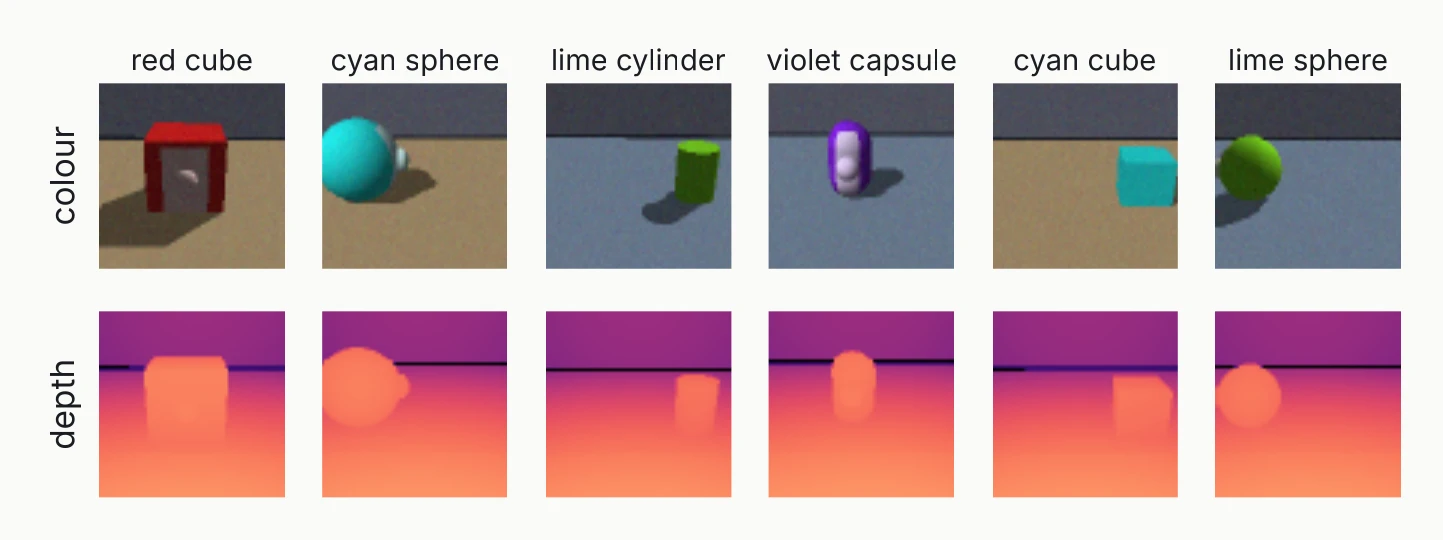
The full grid of factors gives 294,912 photos. I use a subset of 6,144 that is still a complete grid on its own: 4 colours (red, lime, cyan and violet), 4 rotations (0°, 90°, 180° and 270°), 3 positions, 2 lights, and every shape, size and table.
The depth camera sees shape, size, rotation and position. It cannot see colour, light or the table, because none of those change a distance. That detail comes back when we join the two cameras.
What dimensionality reduction does
A colour photo of 64 x 64 pixels with three channels is 12,288 numbers. Apart from a little camera jitter and pixel noise, only seven things change from one photo to the next. If you had to describe a photo in as few numbers as possible and knew the factors, seven would do.
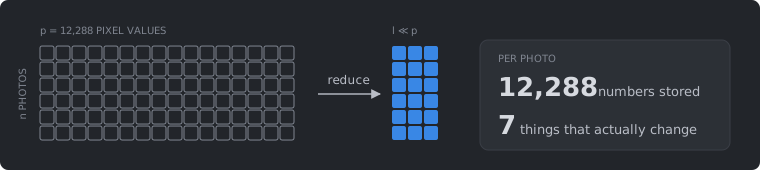
Formally, you start with samples, each described by features, and end with features per sample, where . Some information is always lost on the way. Each method makes its own choice of what to keep, and most of this post is about those choices.
The reduced data are useful in three ways. You can look at them: scatter plots, heatmaps and quality control need two or three dimensions. You can model with them: clustering, classification and trajectories work better on a few informative features. And they make computing cheaper: less storage, faster training and fewer parameters to fit.
A plot of two principal components is easier to read than 12,288 numbers, but each component mixes thousands of pixels, so the plot does not tell you which pixels matter. Feature selection is the exception, because it keeps original measurements you can point at.
The curse of dimensionality
High-dimensional space behaves in ways that 2-D intuition does not prepare you for. The plot below places 500 uniformly random points in a cube of growing dimension. For 20 query points, it compares the distance to the nearest point with the distance to the farthest.
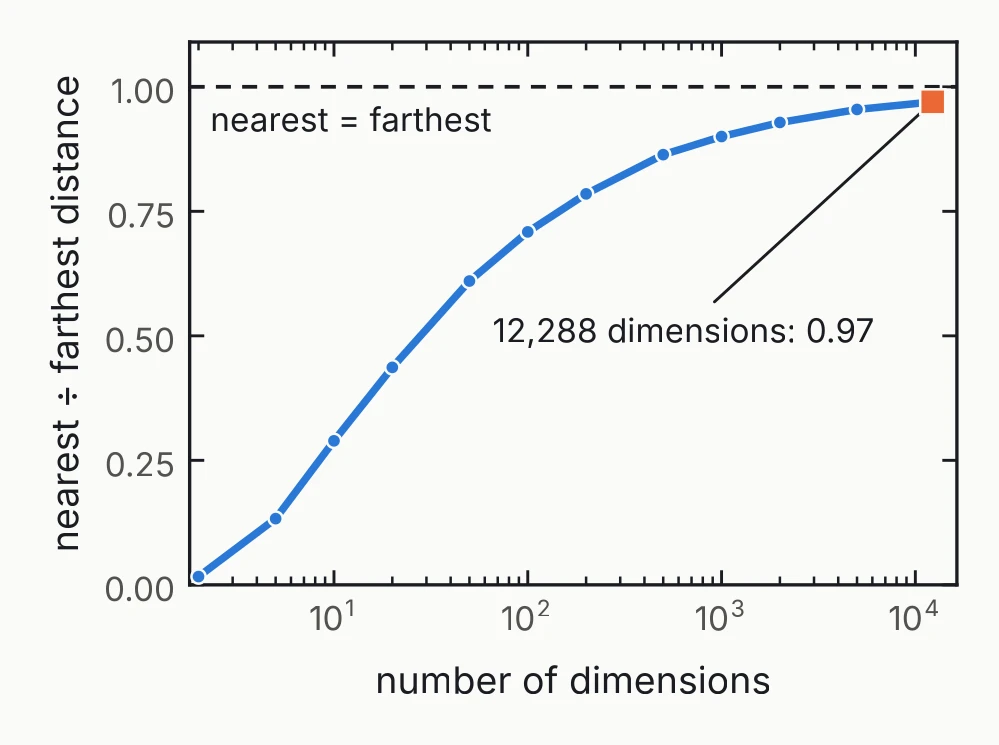
In two dimensions the nearest point is close compared with the farthest. At 12,288 dimensions the nearest point is 97% as far away as the farthest one [3]. When every point is about equally far from every other, neighbourhoods and clusters lose their contrast.
Real data are not uniform, and that is what makes reduction possible. The tabletop photos occupy a thin, roughly seven-dimensional sliver of the 12,288-dimensional pixel space. Every method below is a different way of finding that sliver.
Three ways to get from p features to l
The methods fall into three families. What separates them is what happens to the original features.
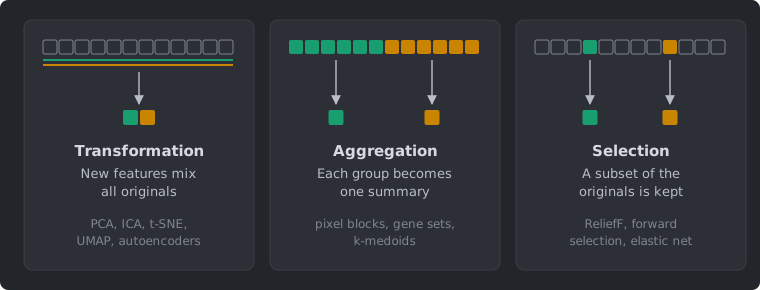
- Transformation builds new features, each a mix of all the originals: PCA, ICA, t-SNE, UMAP and autoencoders.
- Aggregation splits the features into groups and summarizes each group with one number: pixel blocks, gene sets, clusters found by -medoids.
- Selection keeps a subset of the original features: ReliefF, forward selection, the elastic net.
Only selection keeps measurements you can still point at, in our case single pixels. The other two trade that for compactness.
There is also a rough split by supervision. Transformation and aggregation usually run without a target variable. Selection usually keeps whatever predicts a target. The split is only a tendency: linear discriminant analysis is a supervised transformation, and dropping low-variance features is unsupervised selection.
Preparing the data
Before any method runs, the photos have to become a matrix of numbers on a common scale, and the data have to be split.
One step of a longer pipeline
Dimensionality reduction sits in the middle of a longer chain of steps, and the order of those steps matters.
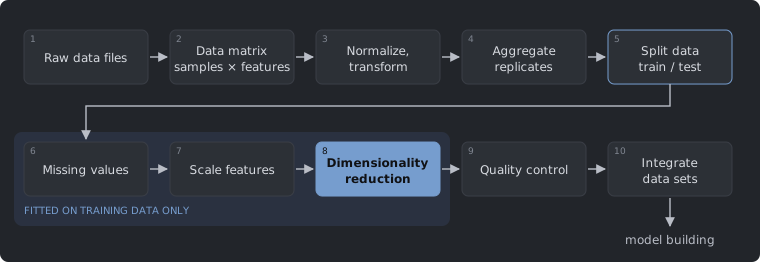
Missing-value imputation, scaling and dimensionality reduction all learn something from the data: a mean, a standard deviation, a set of components. If they run before the split, the test data have already shaped them. So the split comes before them, at step 5, and steps 6 to 8 are fitted on the training data alone.
From image files to an analysis matrix
The tabletop photos come in an HDF5 file. Turning them into a matrix with one row per photo takes a few lines:
with h5py.File("smoke.h5") as f:
    images = f["images"][:]      # uint8,  (6144, 64, 64, 3)
    depth  = f["depth"][:]       # uint16, (6144, 64, 64)
    labels = f["labels"][:]      # int8,   (6144, 7): one level per factor

X = images.astype(np.float32) / 255        # integers 0-255 -> numbers 0-1
X = X.reshape(len(X), -1)                  # (6144, 12288): one row per photo
D = depth.astype(np.float32) * 8 / 65535   # stored steps -> scene units
D = D.reshape(len(D), -1)                  # (6144, 4096)
Three things happen here:
- The types change. Pixels, depths and labels all arrive as small integer types. Anything used in arithmetic becomes a float first, for a reason the next section shows.
- The photos are flattened. Each colour photo becomes one row of 12,288 columns, and each depth image one row of 4,096. This throws away which pixel sits next to which. Methods that use the neighbourhood, such as convolutional networks, keep the 2-D shape instead.
- The labels stay out of
X. The seven factors are what we hope to recover. They colour the plots and serve as targets, but they are never inputs.
Integer types overflow without warning
Both of the bugs below came up while I was preparing the figures for this talk.
| Expression | Expected | Got |
|---|---|---|
(depth * 8 / 65535).max() | 8.0 | 1.0 |
labels[:, 1] * 30 for cyan | 180 | −76 |
labels[:, 1] * 30 for violet | 270 | 14 |
depth is uint16, which holds 0 to 65,535. The file spreads distances from 0 to 8 scene units over those steps, so multiplying by 8 and dividing by 65,535 turns a step count back into a distance. Multiplying the largest value by 8 does not fit in 16 bits, so NumPy wraps the product around and the depth range comes out as 0 to 1 instead of 0 to 8. labels is int8, which holds −128 to 127. The colour label, labels[:, 1], is a hue level from 0 to 11, and the twelve hues sit 30 degrees apart on the colour wheel, so the level times 30 gives the hue angle: 180 for cyan and 270 for violet. Both wrap, to 180 − 256 = −76 and 270 − 256 = 14, and the plot colours come out wrong. Neither case raises an error.
The fix is to convert first, with .astype(np.float32). The habit that catches these bugs is to print each array’s dtype, minimum and maximum right after loading.
Scale before you reduce
Suppose you join the two cameras into one matrix, so each row holds the colour photo followed by the depth image:
| Camera | Features | Range | Share of total variance |
|---|---|---|---|
| Colour | 12,288 | 0 to 1 | 13% |
| Depth | 4,096 | 1.8 to 8 | 87% |
Most reduction methods follow the largest variance. Joined as stored, depth holds 87% of the variance with a third as many features, so depth decides what the method sees.
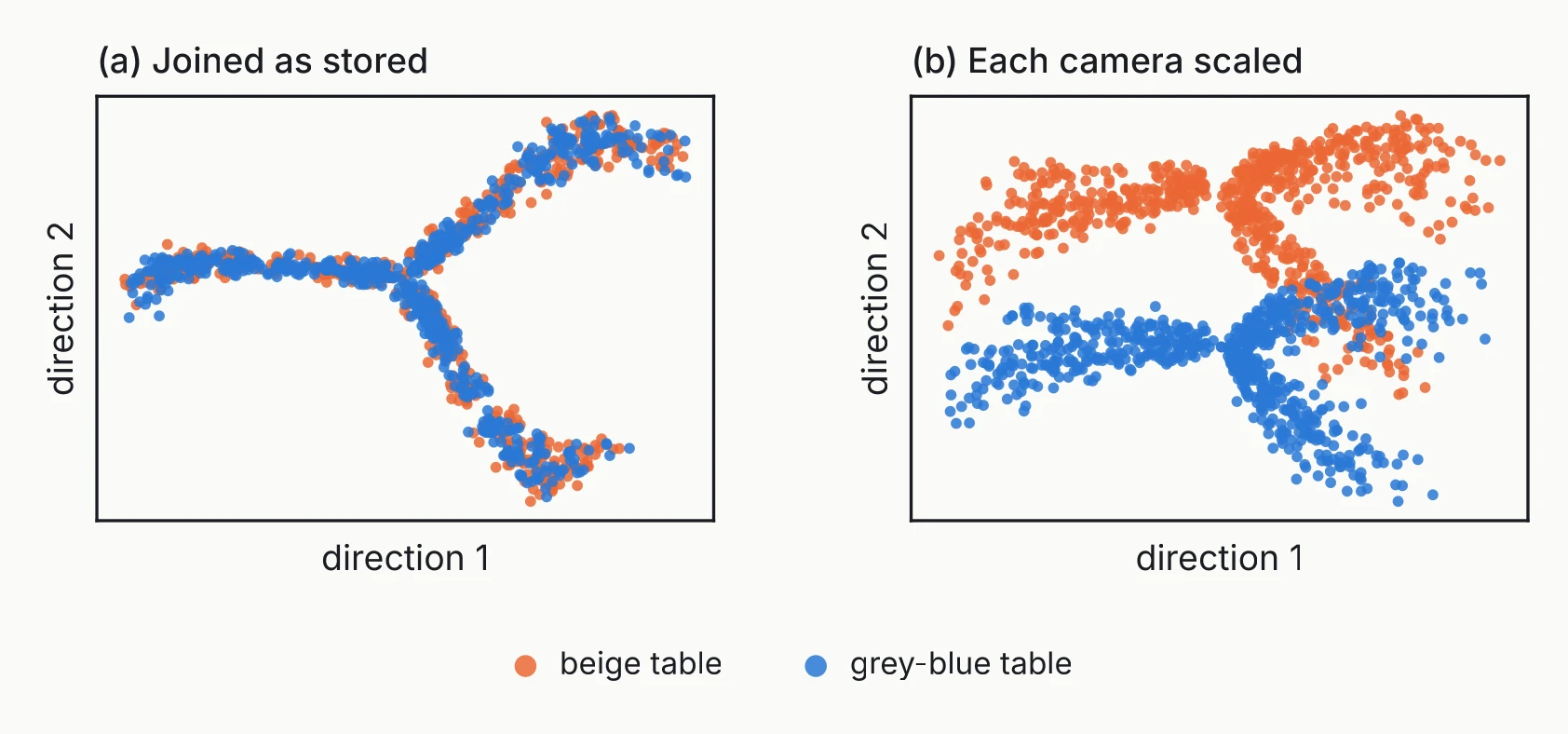
In the colour photos alone, the table is the largest source of variation. The depth camera cannot see the table at all. Joined unscaled, the table vanishes from the top components (left panel). With both cameras scaled to the same total variance, it comes back as the second component (right panel).
There are two common fixes:
- Standardize each feature, subtracting its mean and dividing by its standard deviation: .
- Scale each block (camera, assay, instrument) to the same total variance.
Standardizing works column by column, so it gives the same result before or after the join. Block scaling needs to know which columns came from which camera.
Standardizing is the usual fix when features carry different units: centimetres and kilograms, gene counts and protein levels. For pixels from a single camera it is usually wrong. It would give the dull wall pixels, which barely change, as much weight as the pixels where the object appears. Pixels from one camera already share a scale, so subtracting each pixel’s mean is enough. (Tree-based models need no scaling at all, since a split on one feature does not care about its units.)
Fit preprocessing on the training data only
Imputation, scaling, dimensionality reduction and feature selection all learn from data. Fit them on the training samples, and only apply them to the test samples:
pca = PCA(n_components=50)
Z_train = pca.fit_transform(X[train])   # learns the mean and the components
Z_test  = pca.transform(X[test])        # reuses them, learns nothing
The classic mistake is to choose the top features on all samples and then cross-validate a classifier on those features. The accuracy looks excellent and does not reproduce, because the test samples helped choose the features. scikit-learn’s Pipeline [4] makes the correct version the easy one to write.
Near-identical samples leak as well. A cube one size step larger looks almost the same as the smaller cube, so a random split puts near-copies of each test photo into the training set. Holding out whole groups avoids that. The feature-selection section below holds out one object colour at a time for this reason.
For plots with no test set, fitting on all samples is fine.
Feature transformation
Principal component analysis
Start with two pixels, three rows apart, across all 6,144 photos. They move together, with a correlation of 0.92.
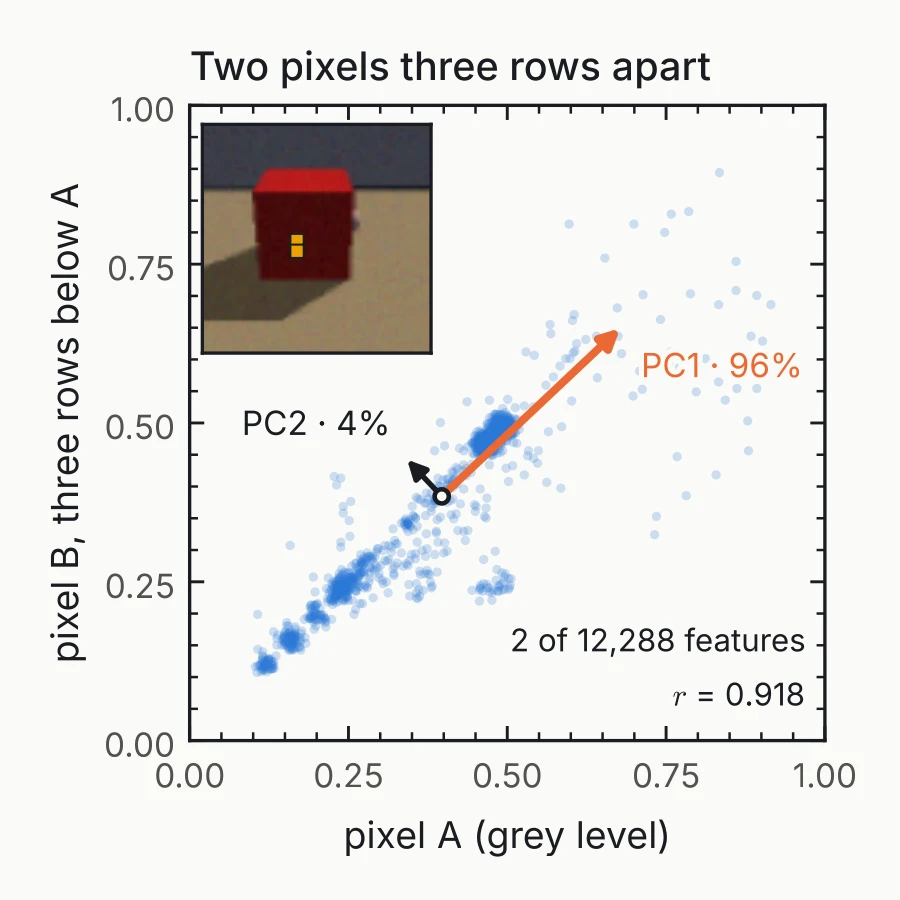
Principal component analysis (PCA) [5] finds the direction of largest variance in the data, then the direction of largest remaining variance at right angles to the first, and so on. For centred data , the first component is the unit vector
For these two pixels, the first component alone carries 96% of the variance. With 12,288 pixels the same redundancy repeats in many directions at once.
With two pixels you can draw the original axes and the components on top of them, as above. With 12,288 pixels you cannot, so you plot the photos along two components instead. Each point is one photo, placed by its score on each component: the weighted sum of its pixels, . The scaling figure earlier is such a plot. PC1 against PC2 shows the most variation of any pair, but for these photos that is only 34% (22% and 12%, as the next figure shows), so other pairs are worth plotting too. Every axis mixes all the pixels, so it means nothing on its own. You find out what it tracks by colouring the points by a known factor, as the scaling figure does with the table, or by drawing the component as an image.
Each component is a weighted sum of all the features. PCA needs no labels, runs fast, gives the same answer every time, and can project new samples onto the components it has learned. It is the usual first look at any new dataset.
The largest variance is not always the variation you care about. It may be technical, or a factor you are not studying, as the next figure shows.
For images, each component is an image
A component has one weight per feature. Here every feature is a pixel, so the 12,288 weights can be put back into the 64 x 64 x 3 grid the pixels came from and shown as a picture. This works only because pixels have a fixed place in a grid. For most data it does not: if the features are age, weight and blood pressure, the weights are just a list. The picture is easier to read added to the mean photo: start from the mean and add or subtract a multiple of the component, and you see what changes along it.
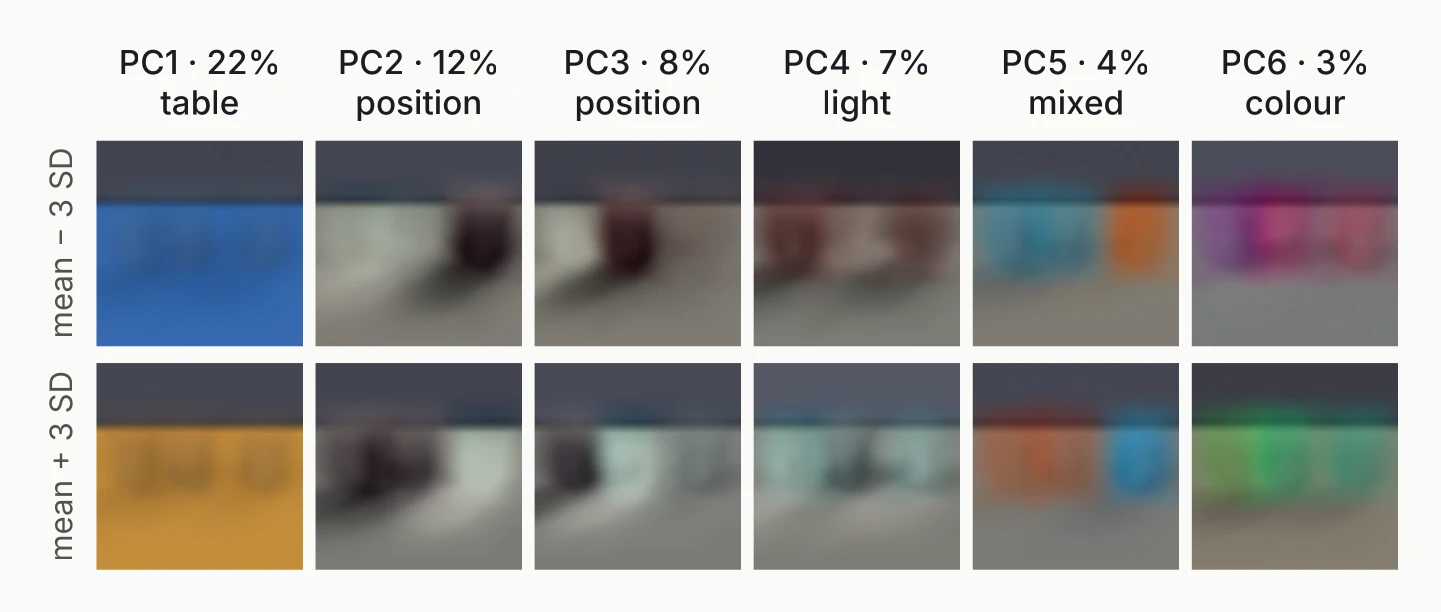
The number above each column is the component’s share of all the variation in the photos. The word below it says what the component tracks. To find it, I gave every photo a score along the component and checked which of the seven factors sorts those scores best. Along PC1, the beige-table photos sit at one end and the grey-blue ones at the other, with almost no overlap, so PC1 is the table. PC2 and PC3 move the object, PC4 changes the light, and PC6 changes the object’s colour. No single factor sorts PC5; it changes colour and position together, so not every component has a clean meaning.
The largest source of variation in these photos is the table, which is rarely what anyone wants to study.
How many components should you keep?
The cumulative explained variance tells you how much each additional component adds.
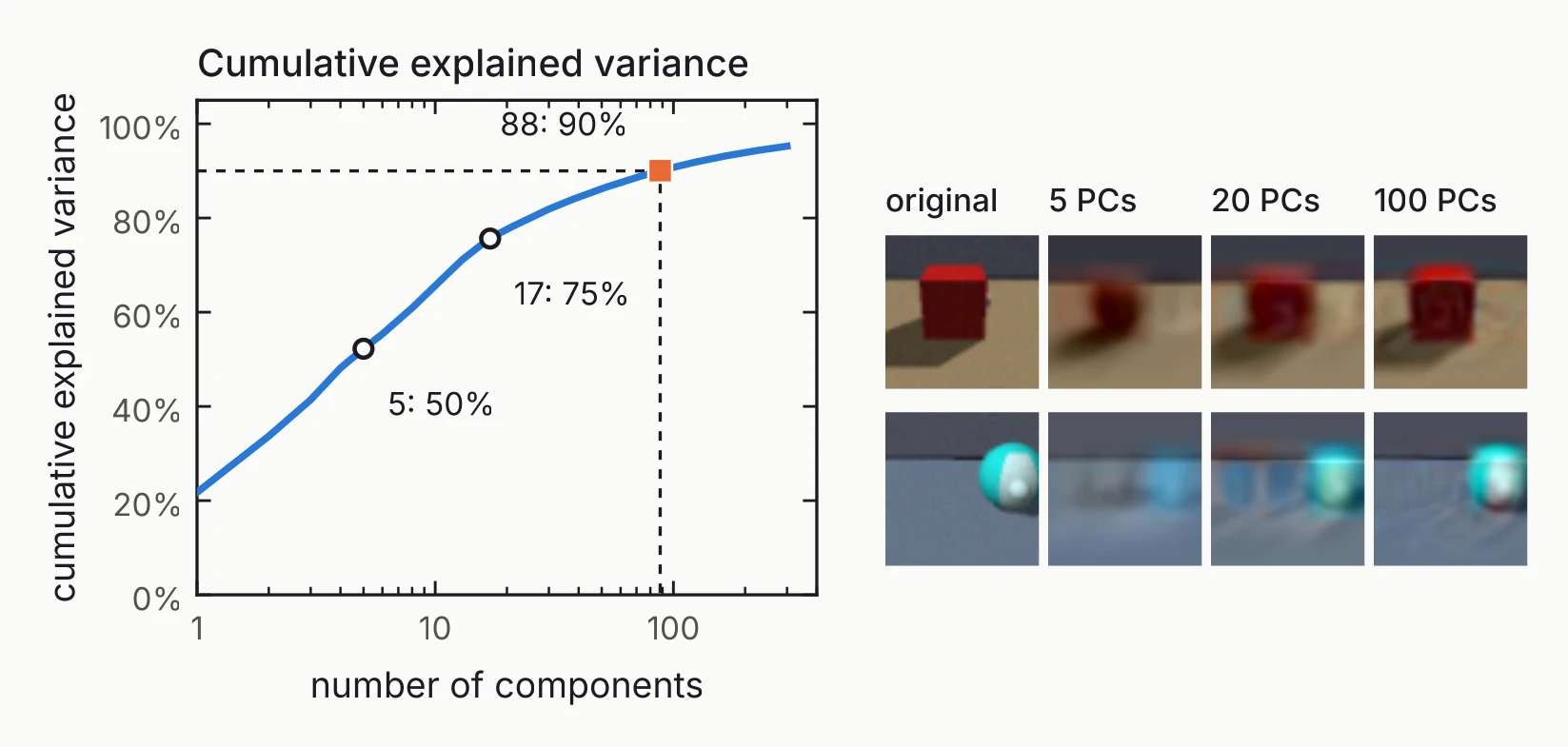
Five components reach 50% of the variance, 17 reach 75%, and 88 reach 90%. So 90% of the variance of a 12,288-number photo fits in 88 numbers.
A variance target such as 75% or 90% is a convention. If the components feed a model, choose their number by cross-validation instead. The rebuilt photos show what the discarded components held: sharp edges and small details go first. With 20 components the position and colour of the object are already there.
Independent component analysis
Independent component analysis (ICA) [6] solves a different problem. Imagine two people talking at a party and two microphones, each recording a different mix of both voices. ICA recovers the two voices from the two recordings.
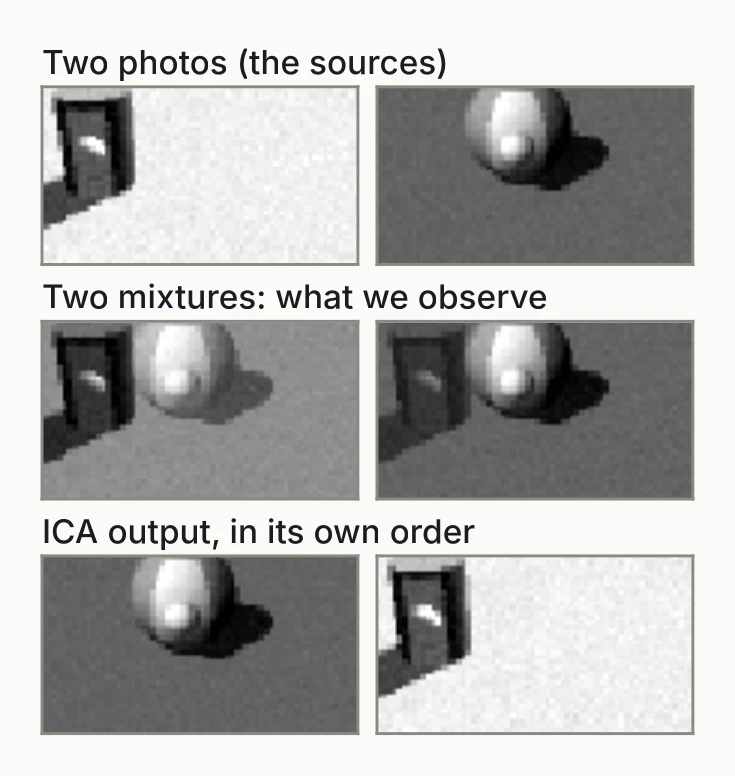
Here the voices are two photos. I mixed their table regions with weights 0.6/0.4 and 0.35/0.65, and ICA recovered both photos almost exactly. It returned them in swapped order, and another random seed could return the other order. Sign and scale are arbitrary too.
ICA looks for components that are statistically independent and non-Gaussian [7]. Independence is a stronger condition than the lack of correlation that PCA gives you. Independent components often line up with distinct underlying processes, even when those carry little variance. In the photos, one factor such as the light changes many pixels at once, and ICA tries to find one component per such source.
| PCA | ICA | |
|---|---|---|
| Keeps | most variance | independent sources |
| Order | by variance | none |
| Good for | dominant effects | mixed signals |
t-SNE and UMAP: neighbourhoods first
PCA and ICA are linear. t-SNE [8] and UMAP [9] are nonlinear methods built to preserve neighbourhoods: photos that are close in the original 12,288 numbers should stay close in the 2-D map.
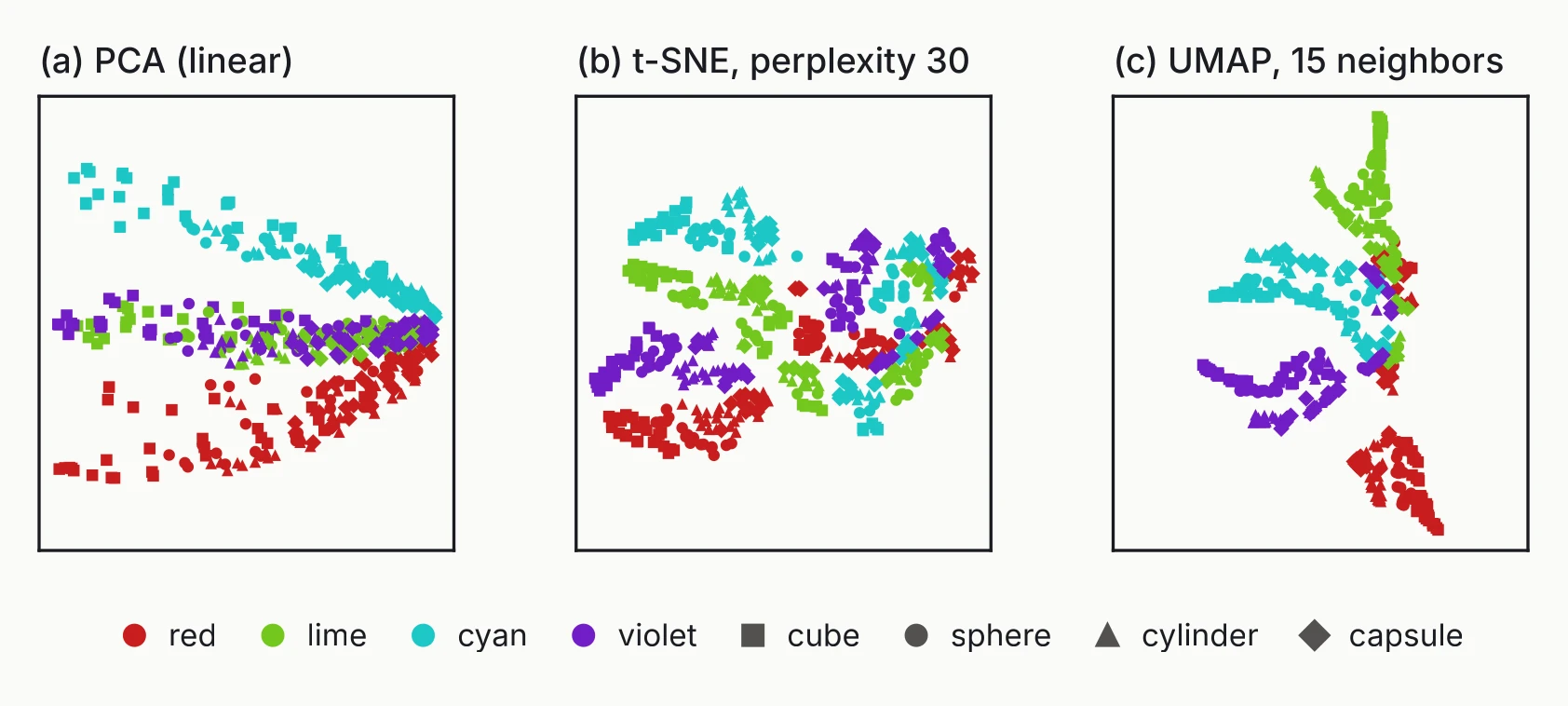
To compare the three maps, I counted neighbours kept: of each photo’s 10 nearest neighbours in the original space, the share that are still among its 10 nearest neighbours in the 2-D map. PCA keeps 29%, t-SNE 63% and UMAP 60%. The measure works for any embedding, and it is worth computing before you trust the local structure of a map.
PCA spreads the photos by size and colour. t-SNE and UMAP group them by colour and shape; in the UMAP map, the size of the object changes along each arm. Perplexity, t-SNE’s main setting, is roughly the number of neighbours each point attends to.
The two methods differ in ways that matter for how you use them:
| t-SNE | UMAP | |
|---|---|---|
| Loss | KL divergence; repulsion only through normalization | cross-entropy with explicit attraction and repulsion |
| New samples | no mapping | can be embedded |
| Output | 2-D or 3-D for plots | any dimension; can feed a downstream model |
| Global layout | distances between clusters mean little | keeps more of it |
| Speed | slower | faster; approximate neighbours, worth checking on small data |
Both methods find a local optimum, so a different seed can give a different layout. Run several seeds before you interpret one. A nonlinear method can follow curved structure and reveal groups that PCA smears together. You pay for that in interpretability, in stability across seeds, and for t-SNE in the ability to embed new points.
Autoencoders
An autoencoder is a neural network trained to copy its input through a narrow middle layer. The encoder compresses a photo to a small latent vector , and the decoder rebuilds a photo from it. Training minimizes the reconstruction error .
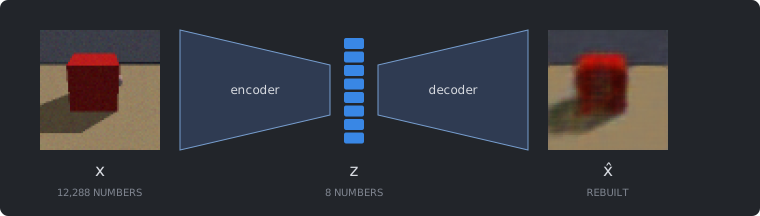
The width of the latent layer sets the reduced dimension: 8 here, 2 if you want to plot it. Once trained, the encoder is a mapping, so new samples can be embedded without retraining.
With the same budget of 8 numbers per photo, the autoencoder rebuilds far better than PCA. Its reconstruction error is 22.7 per photo (squared error summed over the pixels), against 63.0 for PCA with 8 components.
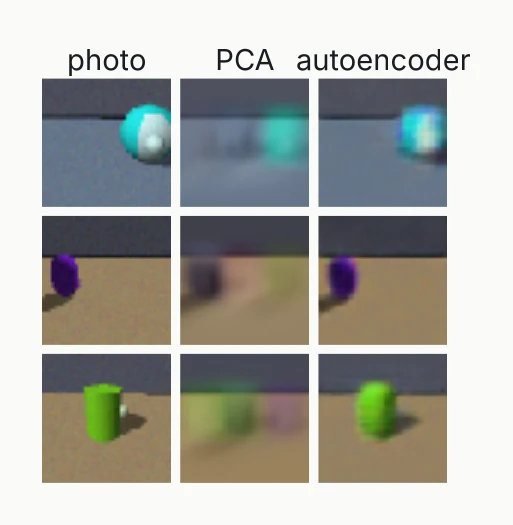
Architecture matters at this size. A dense first layer of 128 units on a 64 × 64 × 3 photo already has 12,288 × 128 + 128 = 1,572,992 weights and biases. The convolutional autoencoder above has 380,779 parameters in total.
PCA is a special case: an autoencoder with linear layers and squared loss learns a latent space that spans the top principal components.
Variational autoencoders
A variational autoencoder (VAE) [10] changes one thing. The encoder outputs a distribution, a mean and a standard deviation for each latent number, and is sampled from it. The loss adds a penalty that pulls each of those distributions towards a standard normal:
The KL term stops the variances from shrinking to zero and the means from drifting apart. Without it, the VAE degenerates into a plain autoencoder. With it, nearby points in the latent space must decode to similar photos, so you can walk through the latent space and watch the photo change gradually.
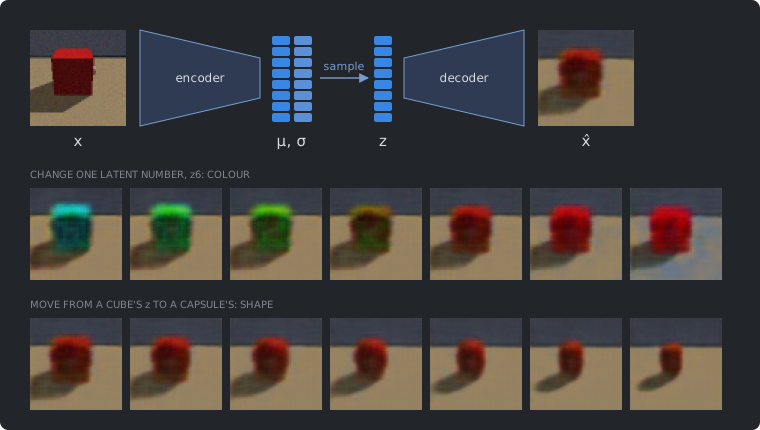
The weight sets the balance. Too small, and the latent space has little structure; too large, and the reconstructions blur. This VAE uses and 8 latent numbers. Its reconstruction error is 27.2 per photo, a little above the plain autoencoder’s 22.7. That gap is the price of the regularization.
In the middle strip, only changes, from −2.5 to 2.5. Across all photos, colour explains 64% of the variance of . Other latent numbers follow the light (63%) and the position (55%). No latent number follows shape; the best reaches 10%. So the bottom strip cannot vary one number. It moves in a straight line from the red cube’s code to the code of a red capsule that matches it in every other factor, and the shape still changes smoothly.
Ideally a VAE on tabletop would give each of the seven factors its own latent number. This one did for colour, light and position, but not for shape, the factor that changes the fewest pixels. Whether a model can separate the factors this way is called disentanglement, and it is the question tabletop was built to test.
Choosing a transformation method
Whether a method can embed new samples decides whether it can sit inside a prediction pipeline.
| Method | Type | Embeds new samples | Typical use |
|---|---|---|---|
| PCA | linear | yes | first exploration, quality control, preprocessing |
| ICA | linear | yes | separating independent underlying signals |
| t-SNE | nonlinear | no | local structure, visualization only |
| UMAP | nonlinear | yes | visualization, and preprocessing for models |
| Autoencoder | nonlinear | yes | learned representations, large data |
Feature aggregation
Aggregation replaces each group of features with one summary, usually the mean or median. Given groups of the features, the new feature of sample is
Groups may overlap, and a feature may belong to no group. Turning a colour photo into a grey one is already aggregation: three channel values become one.
The groups can come from two places. Knowledge-based groups are ones you already know: blocks of neighbouring pixels, or gene sets. They are easy to interpret. Data-driven groups come from clustering the features by how they change together. They can find structure you did not expect, but a cluster may not have a name.
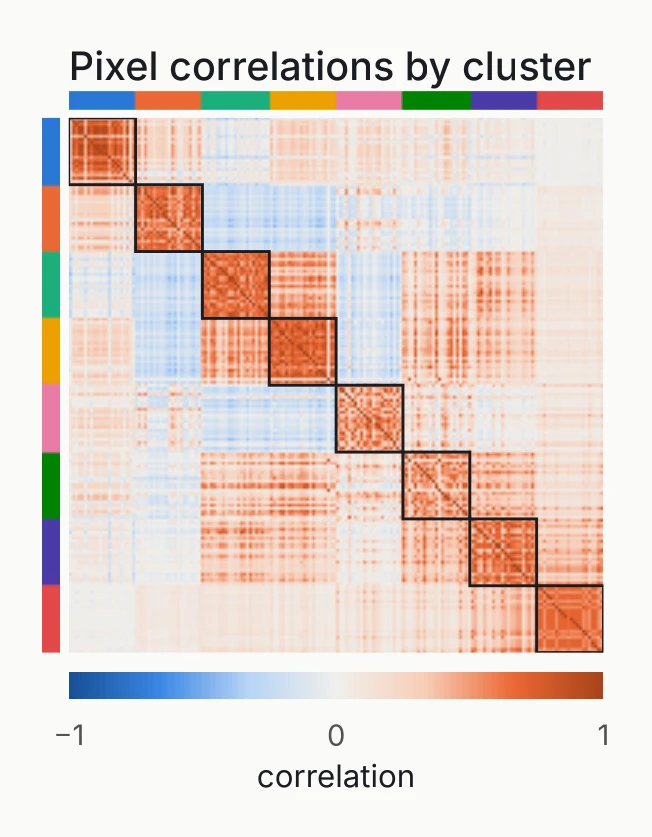
For the data-driven groups I clustered the 4,096 pixel positions with -medoids [11]. Each cluster is summarized around its medoid, a real pixel whose brightness profile best represents the group. -means would give an average profile instead, which is not any pixel you can point at.
The classic algorithm for -medoids is PAM, partitioning around medoids. It picks data points as the first medoids and assigns every point to the nearest one. The cost is the sum of the distances from each point to its medoid. PAM then tries swapping a medoid for another point, keeps the swap if the cost drops, undoes it if the cost rises, and stops when no swap helps. The animation runs PAM on 69 toy points in three blobs with , few enough to follow every step.
The run starts at a cost of 117.2. The first swap it tries raises the cost to 218.0 and is undone. Three of the six swaps shown are kept, and they bring the cost down to 97.1, 83.7 and finally 70.8, where no swap lowers it further. In the last part of the clip six points drift away from the blue cluster. The mean, which -means would use as the centre, follows them. The medoid stays on the same point. A medoid is always one of the data points, so PAM needs only the distances between points, and any distance will do.
PAM tries every medoid–point swap on each pass, which is slow for 4,096 pixels. CLARA [11] runs PAM on a few random samples of the pixels, assigns every pixel to the nearest medoid from each sample, and keeps the set of medoids with the lowest total cost.
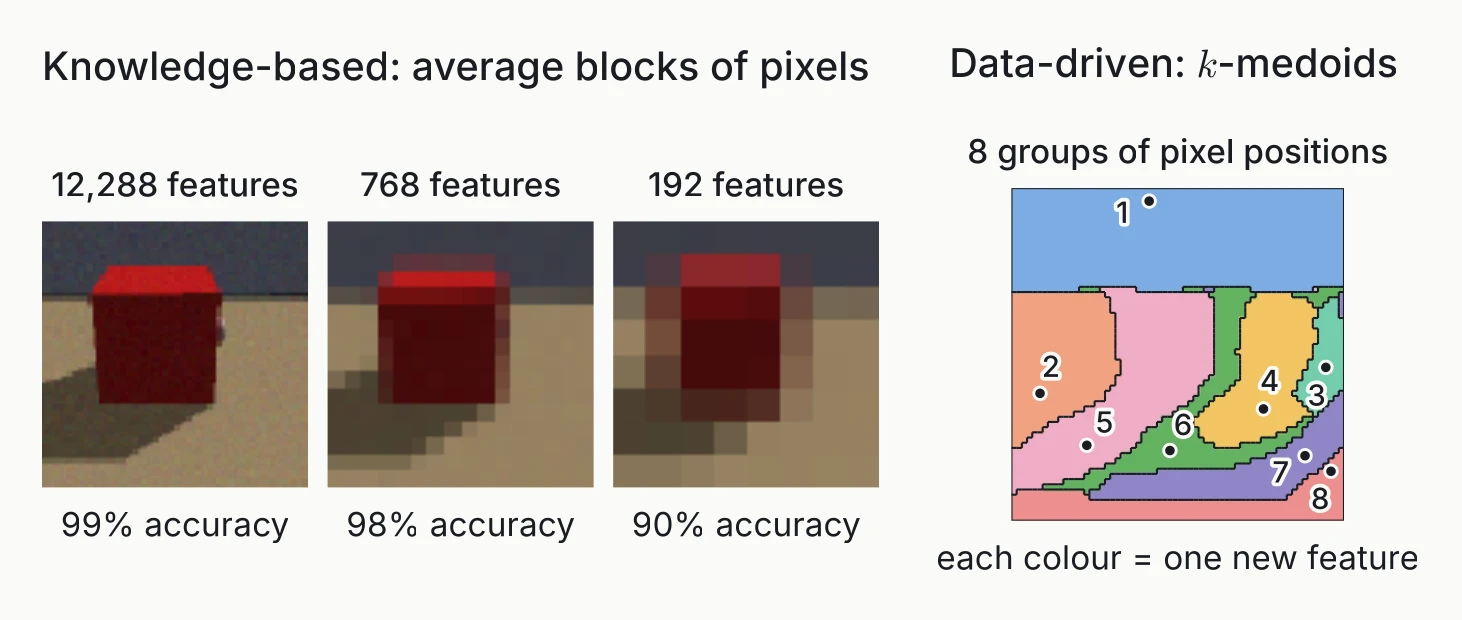
Downsampling a photo is knowledge-based aggregation: we know that neighbouring pixels belong together. To measure what it costs, I trained a logistic regression to tell cubes from spheres on three object colours and tested it on the fourth, averaged over the four colours. At full resolution it gets 99% right. Averaging 4 × 4 blocks leaves 768 features, 16 times fewer, and it still gets 98% right. With 8 × 8 blocks it drops to 90%.
The pixel clusters on the right range from 131 to 1,250 pixels. They are a map of pixel positions, not a photo, and without being told, they find the wall and the regions of the table where objects stand.
Feature selection
The task: is the object a cube or a sphere?
Selection needs a target, so this section uses a classification task. I took the 1,024 photos with a cube or a sphere in the middle of the frame and turned them grey, leaving 4,096 pixels per photo. Grey is the mean of the three colour channels, so each object colour becomes a different shade of grey.
The test is whether the chosen pixels work for an object colour the model has never seen. Each fold trains on three colours (768 photos) and tests on the fourth (256 photos).
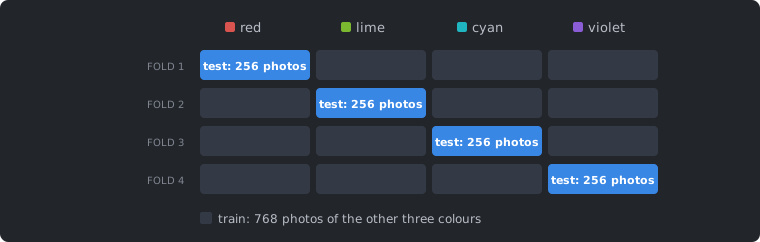
Holding out a colour is harder than a random split. A random split would put photos of the same object, turned by 30°, into both the training and the test set. Each method also produces four models, one per fold, and comparing them tells us how stable the selection is.
There are three families of selection methods [12]:
- Filter methods score each feature first and keep the top ones.
- Wrapper methods search over feature sets, scoring each set with a model.
- Embedded methods select features while the model trains.
Filter methods: ReliefF
ReliefF [13] scores each pixel by how well it separates photos that are close to each other. For each photo , it finds the nearest photos in each class and updates the score of every pixel :
A pixel gains score when it differs between the classes and agrees within one. Take a pixel where a cube has a corner and a sphere does not. It shows the object in cube photos and the background in sphere photos, so the first term is large, the second small, and the score high. A wall pixel looks almost the same in every photo: both terms are near zero, and so is its score.
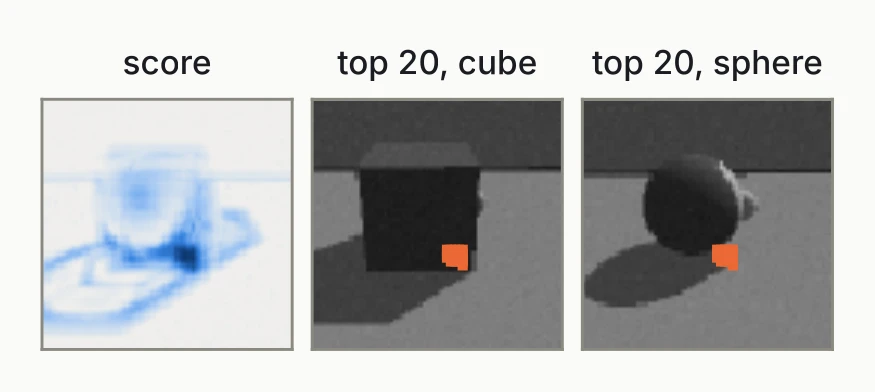
The score map traces the outline of the cube and its shadow, which is where cubes and spheres differ. All of the top 20 pixels sit together near the lower edge of the object. They are near-copies of one pixel, and twenty copies add little over one. This redundancy is the weakness of scoring features one at a time.
ReliefF only proposes features. A separate classifier makes the prediction, here a decision tree on the top 20 pixels. It gets 98% right on the unseen lime and violet objects, 84% on red and 76% on cyan.
Wrapper methods: forward selection
Forward selection starts with no features and adds, at each step, the feature that most improves validation accuracy. To keep the search fast, the candidates here are the 256 averages of 4 × 4 pixel blocks, and the model is a decision tree. Each step tries every remaining block, trains a model on each candidate set, scores it on the three inner validation colours, and keeps the best.
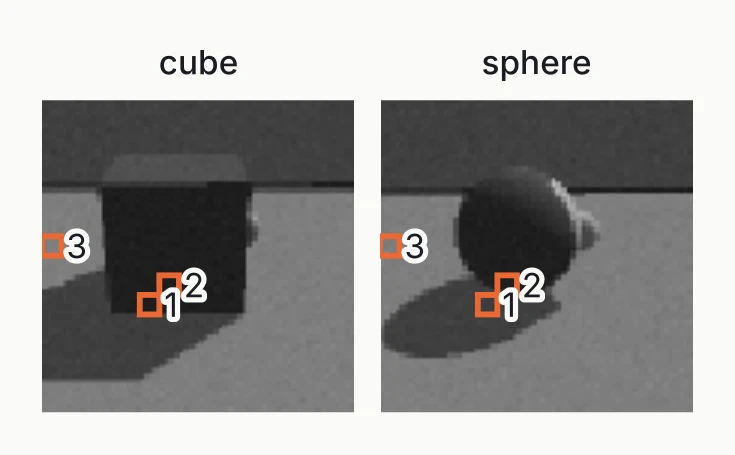
The number of features is now a hyperparameter, so it needs nested cross-validation: an inner loop chooses the features, and an outer loop tests them on the held-out colour. On the unseen colour, the selected blocks give 95% on lime and violet, 90% on cyan and 78% on red.
Greedy search is far cheaper than trying every subset, but it can miss the best combination and overfit the validation data. Backward elimination is the mirror image: start with all features and remove one at a time.
Embedded methods: the elastic net
The elastic net [14] [15] fits a logistic regression with two penalties on the pixel coefficients :
The L1 penalty sets most coefficients to exactly zero, and the pixels with a non-zero coefficient are the selection. The L2 penalty keeps correlated pixels together instead of picking one of them at random. Neighbouring pixels are strongly correlated, which is the case the L2 term was designed for. This is scikit-learn’s formulation: multiplies the data term, so a smaller means a stronger penalty.
With and , the models get 96% to 100% right on the unseen colour while keeping about 210 of the 4,096 pixels each. Selection happens during training, so there is no separate search loop.
Comparing the three families
| Filter | Wrapper | Embedded | |
|---|---|---|---|
| Uses a model? | no | in the loop | in the objective |
| Cost | low | high | moderate |
| Finds joint effects? | often not | yes | partly |
| Picks redundant features? | often | rarely | in groups |
| Overfitting risk | low | high | moderate |
| In this post | ReliefF | forward selection | elastic net |
Wrappers need nested cross-validation, and embedded methods need their penalty tuned. In high dimensions a common, affordable combination is a filter to shrink the pool of features, followed by an embedded model.
Measuring selection stability
Accuracy tells you whether the selected features predict. It does not tell you whether you would select the same features again. With four folds we have four models, and we can compare what they chose.
Let model of select the positive predictors and the negative predictors . The intersections and hold the pixels that every model chose. The stability is
means every model picks the same pixels. A low means the selection depends on the split. For the elastic net on cubes and spheres, each model keeps 203 to 218 pixels, only 146 of them appear in all four, and .
This definition has a weakness: one unusual model can empty the intersection. Nogueira et al. [16] discuss measures with better properties.
Stability separates what accuracy cannot
The next figure runs the elastic net across a range of penalties and plots accuracy and stability side by side.
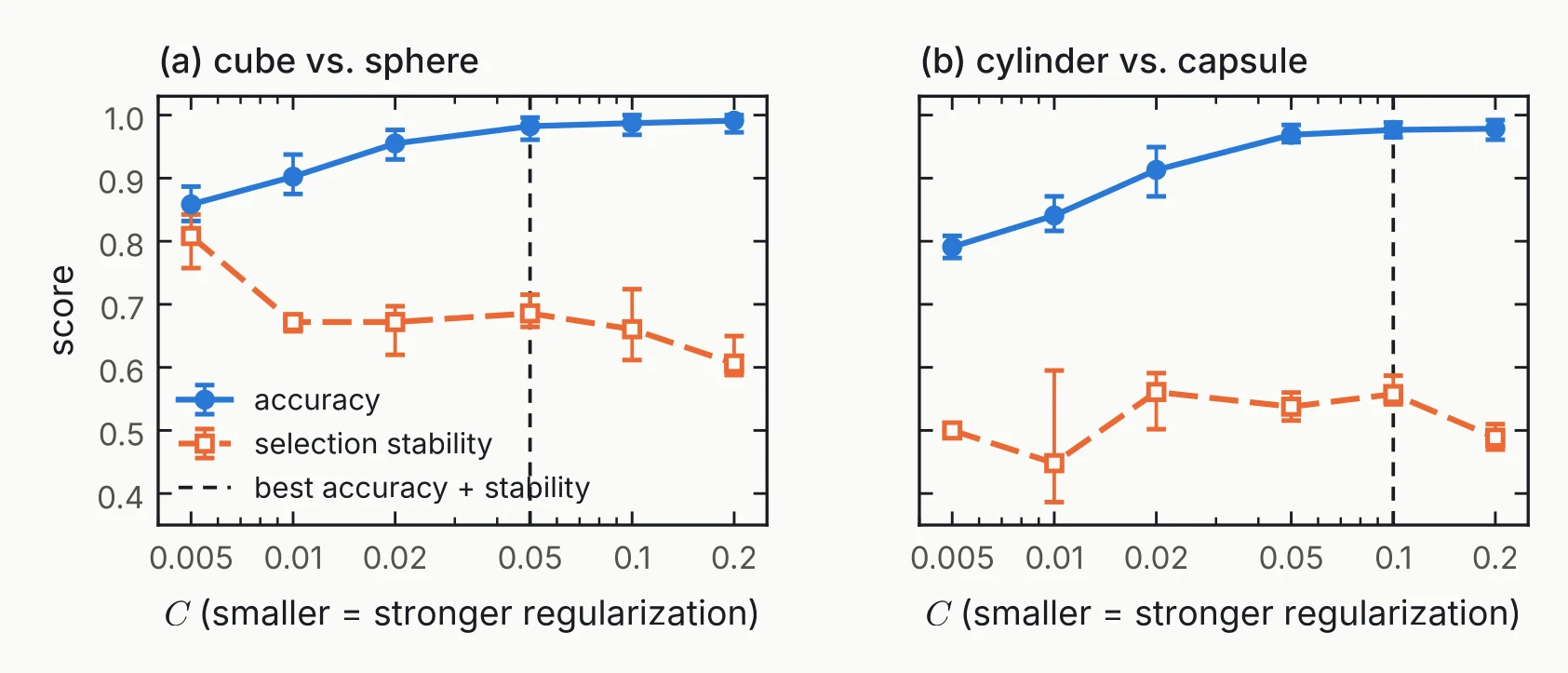
For cubes and spheres, compare and . The accuracy ranges sit on top of each other, so choosing between them on accuracy alone is choosing on noise. The stability ranges do not overlap. With four folds these are ranges rather than confidence intervals, but the difference is still clear.
Cylinder against capsule is a harder task and less stable, with stability between 0.45 and 0.56. Choosing on accuracy plus stability picks there, at almost the same accuracy (97.7% against 97.9% for the most accurate setting).
Stability stays well below 1 because neighbouring pixels carry nearly the same information. Many different pixel sets predict equally well, and a model has no reason to prefer one of them.
Wrap-up
A starting point for your own data
| Goal | Try first | Watch out for |
|---|---|---|
| First look, quality control | PCA on scaled data | the largest variance may not be the one you care about |
| Show group structure | t-SNE or UMAP | seeds, local optima |
| Input for a model | PCA, UMAP, autoencoder | fit inside the cross-validation |
| Interpretable summaries | known groups (aggregation) | only finds the groups you know |
| Which measurements matter | feature selection | nested cross-validation, stability |
Treat the table as a place to start. Try two methods and compare them on the same data. Binary or categorical data need other methods, such as multiple correspondence analysis, logistic PCA, or nonlinear methods on a Jaccard distance.
What to take home
- Prepare before you reduce. Convert the types, flatten, and scale. On tabletop, unscaled depth hides the table from PCA.
- Split first. Fit scalers, reducers and selectors on the training data only.
- Know what you keep. Transformation mixes features, aggregation groups them, and selection keeps a subset.
- Check a nonlinear map before you trust it. Run several seeds and count the neighbours kept. t-SNE is for plots only; UMAP and autoencoders can also feed a model.
- Report stability next to accuracy. Several pixel sets can predict equally well.
Resources
The course notebooks, which use a gene-expression dataset, are at github.com/HelmholtzAI-Consultants-Munich/DimRed-Course. The methods and code carry over to other data unchanged. The tabletop dataset is at github.com/anoopkcn/tabletop.
The course material is by the Helmholtz AI consultant team and licensed CC BY 4.0. tabletop is MIT-licensed.
References
- Helmholtz AI consultant team. Dimensionality reduction course. CC BY 4.0. GitHub
- A. Kaithalikunnel Chandran. tabletop: a complete factor grid in colour, depth and words. v2.0.0, 2026. GitHub
- K. Beyer, J. Goldstein, R. Ramakrishnan, U. Shaft. When Is “Nearest Neighbor” Meaningful? ICDT 1999. doi:10.1007/3-540-49257-7_15
- scikit-learn developers. Pipelines and composite estimators. scikit-learn.org
- I. T. Jolliffe, J. Cadima. Principal component analysis: a review and recent developments. Phil. Trans. R. Soc. A 374, 2016. doi:10.1098/rsta.2015.0202
- A. Hyvärinen, E. Oja. Independent component analysis: algorithms and applications. Neural Networks 13, 2000. doi:10.1016/S0893-6080(00)00026-5
- J. Shlens. A Tutorial on Independent Component Analysis. 2014. arXiv:1404.2986
- L. van der Maaten, G. Hinton. Visualizing Data using t-SNE. JMLR 9, 2008. jmlr.org
- L. McInnes, J. Healy, J. Melville. UMAP: Uniform Manifold Approximation and Projection for Dimension Reduction. 2018. arXiv:1802.03426
- D. P. Kingma, M. Welling. An Introduction to Variational Autoencoders. 2019. arXiv:1906.02691
- L. Kaufman, P. J. Rousseeuw. Finding Groups in Data: An Introduction to Cluster Analysis. Wiley, 1990. doi:10.1002/9780470316801
- I. Guyon, A. Elisseeff. An Introduction to Variable and Feature Selection. JMLR 3, 2003. jmlr.org
- M. Robnik-Šikonja, I. Kononenko. Theoretical and Empirical Analysis of ReliefF and RReliefF. Machine Learning 53, 2003. doi:10.1023/A:1025667309714
- H. Zou, T. Hastie. Regularization and variable selection via the elastic net. JRSS B 67, 2005. doi:10.1111/j.1467-9868.2005.00503.x
- J. Friedman, T. Hastie, R. Tibshirani. Regularization Paths for Generalized Linear Models via Coordinate Descent. J. Stat. Softw. 33, 2010. doi:10.18637/jss.v033.i01
- S. Nogueira, K. Sechidis, G. Brown. On the Stability of Feature Selection Algorithms. JMLR 18, 2018. jmlr.org