Contents
- zenv: project environments on laptops and HPC clusters
zenv: project environments on laptops and HPC clusters
Before a Python project runs on JURECA, one of the clusters at the Jülich Supercomputing Centre, the shell needs three things: the site’s modules for the compiler stack including Python, a virtual environment built on that Python, and the variables the project reads. By hand, that is
module load Stages/2026 StdEnv Python
source ~/sim/.venv/bin/activate
export SIM_DATA=/p/scratch/myproject/sim/data
typed again in every new shell and copied into every batch script(+ a one time cost of setting up the environment). The order matters as well: the venv’s Python is the module’s Python, and without the modules loaded it does not start at all, because it cannot find its own libpython3.13.so. And the steps are slow. On a JURECA login node, loading the modules and starting Python takes about a second, of which Python itself needs 20 ms.
zenv is a tool I wrote to keep these steps in a file next to the code, so that a project’s environment can be rebuilt on any machine and entered by name. It covers the cluster side, the modules and their slow loading, as well as the Python side, and every part is optional: on a laptop, the same tool can manage nothing but a venv.
It treates the environment as data. zenv records what activating an environment does, and replays that record in subsequent activations. The result is fast, reproducible, and usable from any shell, directory, batch script and Jupyter kernel.
It also comes with a shell hook that activates the environment when you cd into the project and deactivates it when you leave the directory. No variable pollution, no stray entries in PATH, and no typing the same three lines over and over.
One file next to the code
The three lines become an entry in zenv.json at the root of the project. A file can hold several environments, here one for a laptop and one for JURECA:
{
  "base_dir": ".zenv",
  "sim": {
    "target_machines": ["*"],
    "dependency_file": "requirements.txt",
    "env": { "SIM_DATA": "${ZENV_PROJECT_DIR}/data" }
  },
  "sim-jureca": {
    "target_machines": ["jurecadc"],
    "modules": ["Stages/2026", "StdEnv", "Python"],
    "dependency_file": "requirements.txt",
    "env": { "SIM_DATA": "/p/scratch/myproject/sim/data" }
  }
}
base_dir is where the environments are built, relative to the zenv.json file. target_machines names the machines an environment is meant for, zenv matches it against $SYSTEMNAME where a site sets it. So One can describe multiple environments that target different machines in the same file. zenv also expands variables like $HOME, ${ZENV_PROJECT_DIR} and ${ZENV_ENV_DIR} and takes everything else literally.
Build the environment once on each machine, and use it from then on:
zenv setup sim-jureca --uv # modules, venv, requirements.txt
# --uv flag makes setup install packages with uv instead of pip.
source # activate; deactivate undoes it
zenv run sim-jureca python train.py # one command, no activation
Setup also registers the environment in ~/.zenv/registry.json, which lets the other commands find it by name from any directory. Inside the project, . stands for the project’s environment on the current machine, so zenv run . python train.py works unchanged on the laptop and on JURECA.
For a new project, zenv init writes a zenv.json from what it finds, such as a requirements.txt or a pyproject.toml, and zenv validate reports mistakes in the file with line numbers.
Activation as data
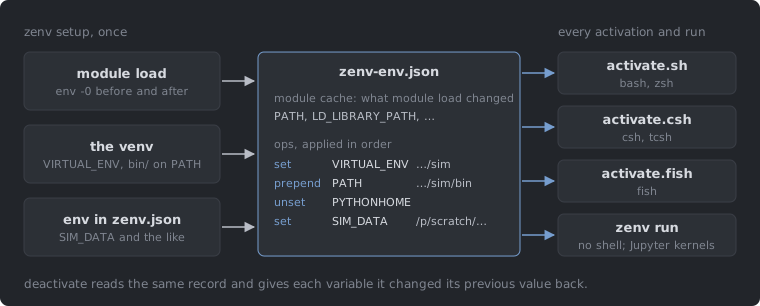
An activation script is a small program. Each time it runs, it calls module load, which has Lmod work out the modules again, and then edits PATH and the other variables. zenv runs those steps once, during setup, and keeps the result.
To do that, setup starts one bash process that purges the modules, writes out its environment with env -0, loads the modules, and writes the environment out again. The difference between the two snapshots is the module cache: the variables the modules set, and the entries they put in front of or behind the old value of PATH, LD_LIBRARY_PATH and the other path variables. zenv stores it as a list of operations (set, prepend, append, unset), followed by the operations for the rest of activation: the venv’s VIRTUAL_ENV and bin/ directory, the variables from env, and a few for zenv’s own use. Together they make up zenv-env.json, the record of what activating the environment does.
Every way of entering the environment reads that record. The activation scripts for bash and zsh, csh and tcsh, and fish are generated from it, and zenv run applies it to its own process without starting a shell.
Replaying the record costs little. On a JURECA login node, zenv run starts Python from a module-based environment in 21 ms, where Python started directly takes about 20 ms. With "module_cache": false, zenv calls Lmod on every use instead, and the same command takes about a second. Activation in an interactive shell gains in the same way, since with the cache the generated script does not call module: in bash it takes 9 ms with the cache and about a second without.
Because zenv knows exactly what activation changed, it can undo it. deactivate gives each variable its previous value back, or unsets it if it had none, and activating a second environment deactivates the first. Switching back and forth leaves no stray entries in PATH.
The record also makes the environment usable where nobody types source. zenv run replaces itself with the command it starts, so the exit status and signals are the command’s own, which is what a batch script expects from zenv run sim-jureca python train.py. Jupyter kernels made with zenv jupyter create sim-jureca start through zenv run as well. A notebook then gets the environment’s modules even when the Jupyter server was started with other ones, and the Interrupt button reaches the Python process. The environment needs ipykernel for this.
Two things cannot be recorded. Hooks in activate.commands or activate.script are shell code, so an environment that has them is run by sourcing its activate.sh in bash; plain variables belong in env, where they stay data. And the module cache does not notice when the site changes its modules. It is tied to the cluster through $SYSTEMNAME, so it is reused on every node of JURECA and never replayed on another system, but after a module is updated during maintenance, run zenv setup again to capture it afresh.
Python on top of the modules
On a laptop the Python part is most of what zenv does. On a cluster it has to fit around the modules.
zenv picks the interpreter in a fixed order: a Python from the loaded modules first, then the fallback_python named in zenv.json, then a Python installed and pinned with zenv python install and zenv python pin, then the system’s python3. If the pyproject.toml that setup reads declares requires-python, setup checks the chosen interpreter against it before creating anything, and when it does not match, says which of these to change.
zenv writes the venv itself. A venv is a pyvenv.cfg file, bin/python links to the base interpreter and empty site-packages directories, and zenv creates them directly, without python -m venv or ensurepip. It then installs pip into the venv, with uv when you pass --uv. A new environment without packages is ready in 115 ms on a Mac, where python -m venv alone takes 1.5 s.
Modules often ship Python packages of their own, such as numpy or mpi4py built against the site’s libraries. Before installing, zenv reads the package metadata in the directories on the modules’ PYTHONPATH, the same *.dist-info and *.egg-info entries that importlib.metadata reads, and leaves out every requirement a module already provides, listing what it left out. --force installs them anyway.
New dependencies go in with zenv add, which installs a package and then records it in the project’s manifest:
zenv add . "xarray>=2024.1" --uv   # recorded in the manifest
zenv add . pytest --dev --uv       # as a development dependency
Where the package goes depends on what the environment uses: a line appended to requirements.txt, an entry in [project].dependencies (or [dependency-groups].dev with --dev) of pyproject.toml, where zenv rewrites only that entry and leaves comments alone, or the dependencies list in zenv.json. The manifest changes only after the install succeeds, so a misspelled package name leaves the files as they were.
From any directory
Registered environments can be used by name wherever you are. zenv ls lists the ones for the current machine, cd $(zenv cd sim-jureca) goes to the project, and zenv alias create gives an environment a second name.
Aliases also help on shared filesystems. JURECA and JUWELS mount the same project directories, so one checkout serves both, with an environment for each machine in its zenv.json. Give both environments the same alias, and the alias picks the one whose target_machines match the machine you are on:
zenv alias create hpc sim-jureca
zenv alias create hpc sim-juwels
zenv run hpc python train.py    # sim-jureca on JURECA, sim-juwels on JUWELS
. resolves the same way.
For zsh and bash there is a hook that activates a project’s environment when you cd into the project and deactivates it when you leave, much as direnv does:
eval "" # in ~/.zshrc; for ~/.bashrc, zenv hook bash
It activates only environments you have set up yourself, so the zenv.json in a freshly cloned repository does nothing until you run zenv setup.
zenv also keeps an environment in step with its configuration. zenv run, zenv activate and zenv cd compare the environment’s entry in zenv.json, and the dependency and module files it names, with their state at the last setup. If anything changed, they rebuild first, with the flags of that setup, so --uv sticks. Add a line to requirements.txt, and the next zenv run installs the package before it runs your command. When the module list has not changed, the rebuild replays the module cache instead of calling Lmod again; on JURECA that brought the setup of a three-module environment from 1.25 s down to 0.16 s. The cd hook is the exception. It never rebuilds, so that cd stays fast, and prints a line saying the environment is out of date instead.
Environments without Python
Nothing above requires Python. A C++ project can use zenv for its compilers and variables alone:
{
  "base_dir": ".zenv",
  "tools": {
    "target_machines": ["jurecadc"],
    "python": false,
    "modules": ["Stages/2026", "GCC", "CMake"],
    "env": {
      "PATH": { "prepend": "${ZENV_PROJECT_DIR}/scripts" },
      "OMP_NUM_THREADS": "8"
    }
  }
}
Setup loads and caches the modules, creates an empty bin/ directory that activation puts on PATH, and runs any setup hooks. There is no venv, and activation does not set VIRTUAL_ENV, so uv and pip will not mistake the environment for one. Setting "python": true later adds a venv in the same directory and keeps the modules, the hooks and the files in bin/.
How fast it is
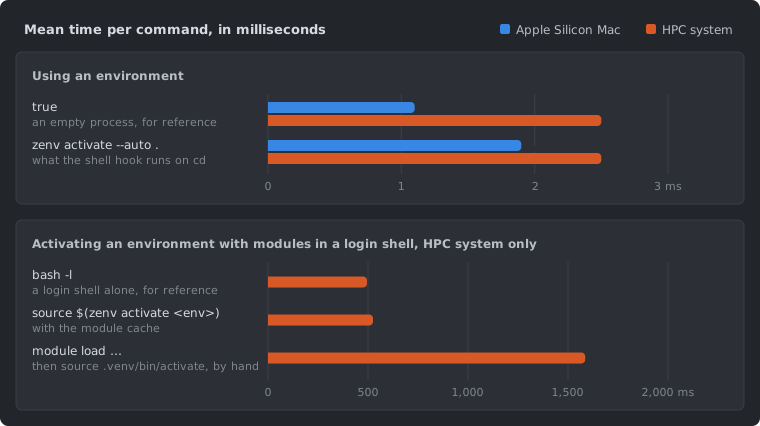
zenv is a single binary written in Zig, statically linked on Linux, and needs no Python to run, so it works on a machine before any Python is set up. Its own commands cost about as much as starting an empty process. The time you notice comes from the programs it starts: uv, Lmod and Python.
| Mean time (ms) | Mac | HPC system |
|---|---|---|
true, an empty process | 1.2 | 2.1 |
zenv ls | 1.9 | 2.0 |
zenv activate <env> | 2.0 | 2.2 |
zenv run <env> true | 3.1 | 3.9 |
bash -l, a login shell alone | – | 495 |
source $(zenv activate <env>) in a login shell, with modules | – | 525 |
module load and source .venv/bin/activate by hand, in a login shell | – | 1,586 |
zenv setup <env> --uv, nothing changed | 21 | 166 |
zenv setup <env> --uv, new environment without packages | 115 | 358 |
python -m venv, for comparison | 1,456 | 2,618 |
The numbers are hyperfine means for zenv 0.28 on an Apple Silicon Mac and on an HPC system, a JURECA login node (256 CPUs, project on GPFS). The login node is shared with other users, so its numbers vary by about 0.8 ms. The three login-shell rows need modules, so the Mac has none; they come from an earlier run with zenv 0.27.8, whose zenv activate took 1.9 ms longer.
Getting it
zenv runs on Linux and macOS, on x86_64 and aarch64:
curl -fsSL https://raw.githubusercontent.com/anoopkcn/zenv/HEAD/install.sh | bash
# or
brew install anoopkcn/zenv/zenv
The source and the full reference, with every key of zenv.json and the rules the cd hook and the module cache follow, are at github.com/anoopkcn/zenv.